> This is part 1 of 2 of the full documentation (pages 1–100 of 104).
> The content is paginated: fetch every part to see all of it.
> Next part: https://help.trade.fun/llms-full.txt/1
> Page index: https://help.trade.fun/llms.txt

# About Trade.fun

Discover what makes trade.fun different from other trading platforms. Learn about our lighting fast execution, advanced trading tools, bank-level security and transparent fee

**trade**<mark style="color:$primary;">**dot**</mark>**fun** is the fastest and fully on-chain trading platform where you can trade memecoins, perps with up to 40x leverage, farm yield, or dabble in prediction markets – all from a trading workplace you can customize with drag and drop functionality.

### Why use **trade**<mark style="color:$primary;">**dot**</mark>**fun**?

* Near Instant Latency.
* Customized trading termina&#x6C;**:** drag and drop modules, hot-keys and layouts that match your trading style.
* Trade anything, anywher&#x65;**:** snipe memecoins, Hyperliquid-powered perps and spot, Kamino yield, Polymarket predictions and more.
* <mark style="color:$primary;">**$TRADE**</mark> econom&#x79;**:** Earn points on every trade 😉. 75% of all fees go straight back to the community.
* MEV Shield & Smart Routin&#x67;**:** Automatically protect every order from front running and sandwich attacks thanks to our built in MEV Shield while smart routing for the lowest slippage.

**We put you first. Our goal is to build the best possible product possible without extracting like our competitors.**

***

### **What Makes trade**<mark style="color:$primary;">**dot**</mark>**fun Unique?**

* Homepage — A full market snapshot at a glance. Trending tokens, major asset prices (heat map or grid), 24h platform activity, your live portfolio breakdown, and favorites — all in one dashboard that updates in real time.
* Instant Charts & Picture-in-Picture – Charts load in milliseconds. Pop any chart into a floating PiP window so you can keep watching price action while navigating the rest of the platform.
* Favorite Groups & Extended Favorites – Organize tokens into custom groups and pin your favorites to the top bar for instant access across sessions.
* Instant Trades – Execute trades with zero gas and 1-click confirmation. No wallet popups, no waiting.
* DCA & Trailing Stop – Built-in advanced order types so you can dollar-cost average in or protect profits with trailing stops — no third-party tools needed.
* Memescope with ATH, KOLs & Time-Based Filters – Not just another scanner. Filter by all-time high recency, KOL activity, and custom time windows to catch what others miss.
* Advanced Search – Find any token by name, symbol, contract, or creator. Quick-filter by protocol, set minimum liquidity and fee thresholds, toggle holder and fee columns, and sort by time, market cap, volume, or liquidity.
* Pinned Tweets & Token Tweets – See the most recent and top tweets for any token directly on its page. Pin key tweets so they stay visible while you trade.
* Alpha Tracker – A real-time feed of key on-chain events as they happen. Spot which tokens are gaining traction and why before the crowd catches on. Filter by event type, enable toast notifications so you never miss a signal, and adjust alert duration to match your pace.
* Customizable Trading Pages – Move, resize and arrange every element of your layout – charts, trades, holders, tweets, or use prebuilt templates to start fast.
* First 100 Buyers – View the first 100 wallets that bought any token and track if they've sold, held, or added more for an instant read on early conviction.
* Pump.fun Creator Fees – Instantly check how much any Pump.fun creator has earned from their token – complete transparency built in.
* Fee Breakdown – See exactly where every fee goes – gas, bots, bribes, and protocol share – full transparency on every trade.
* Prediction Markets – Trade events like politics, sports and crypto outcomes directly inside **trade**<mark style="color:$primary;">**dot**</mark>**fun** – no bridges or app-switching required.
* Pump Gainers – Track every trending Pump.fun token in one place with live data, fast charts \
  and real-time updates.
* Spot & Perp Trading (Hyperliquid Integration) – Access BTC, ETH, SOL and 100+ tokens in a single interface with **instant fills and withdrawals.**
* Leverage Tools – Get ahead of volatility with features like Trump Schedule and Liquidation Depth, showing where whales and market makers could get hit.
* Yield (by Kamino) – Park idle SOL or USDC into Kamino vaults to earn yield directly inside the platform.
* Earn <mark style="color:$primary;">**$TRADE**</mark> with Every Fill – 75% of all platform fees go **straight back to the community.** Every trade earns you points 😉, reducing your fees and boosting your multiplier along the way.

***

{% content-ref url="/pages/raSQufn9sLRqvLKdrVNy" %}
[Security](/getting-started/about-trade.fun/security)
{% endcontent-ref %}

{% content-ref url="/pages/UOXNmjwYRblaSZDud4ui" %}
[The Problem](/getting-started/about-trade.fun/the-problem)
{% endcontent-ref %}


# Security

**At trade**<mark style="color:$primary;">**dot**</mark>**fun, security meets speed.**\
We’ve built a non-custodial trading experience that’s as secure as it is seamless with no compromises.

Your wallet on **trade**<mark style="color:$primary;">**dot**</mark>**fun** is powered by **Turnkey**, a battle-tested key infrastructure. Your private keys never touch our servers. Our secure architecture and layered encryption keep your private keys fully protected and out of reach even from us.

### How Private Key Management Works at **trade**<mark style="color:$tint;">**dot**</mark>**fun**

We use [**Turnkey**](https://www.turnkey.com/) to manage your private keys securely because storing them yourself or on your own servers just isn’t safe enough. Turnkey is a modern key management system built by former Coinbase Custody engineers, designed specifically for secure, scalable, non-custodial applications like **trade**<mark style="color:$primary;">**dot**</mark>**fun**.

#### What Turnkey Does

When you create or import a wallet through **trade**<mark style="color:$primary;">**dot**</mark>**fun**:

1. **Key Generation & Storage**\
   Your private key is generated inside a **secure enclave** a tamper-proof hardware-backed environment that even Turnkey **can’t access** once created.
2. **Controlled Access via Policies**\
   **trade**<mark style="color:$primary;">**dot**</mark>**fun** sets up cryptographic **access policies** that define when and how a key can be used (Limit orders, advanced order types). For example, you may need to sign in, complete 2FA, and provide your decryption password to approve a trade.

***

**In short:** Turnkey keeps your keys safe. We make sure **only&#x20;*****you*** can use them.

Want more details? Reach out to us and we’ll walk you through our full security flow:

[Support](/getting-started/support)


# The Problem

### The problem with traditional trading platforms

In the current landscape of crypto, most platforms follow a **value extraction** model. They charge high trading fees, **often up to 1% per transaction,** costing users thousands over time with no benefits. \
traditional platforms don't move fast enough to develop cutting edge tools leaving traders with missed opportunities to profit.

To date, over **$2 billion** has been extracted from the Solana ecosystem alone. Platforms such as Photon, BullX and Axiom have collected hundreds of millions in trading fees, while the broader trading community sees none of that value reinvested. In fact, more than **$1.5 million** is removed from the ecosystem **every single day** through platform fees, with no return to users or developers.

This model not only isolates traders but also stifles the growth and sustainability of the broader crypto market.

<figure><img src="https://2688198036-files.gitbook.io/~/files/v0/b/gitbook-x-prod.appspot.com/o/spaces%2FhntkAx0dqGAXIejmltGN%2Fuploads%2FpK353K6VJoNh7ARoakfX%2FChatGPT%20Image%20Jan%2021%2C%202026%2C%2005_15_26%20PM.png?alt=media&amp;token=985768dc-ea27-4fc9-bf30-a68dc8144283" alt=""><figcaption></figcaption></figure>


# FAQs

<details>

<summary>What is <strong>trade</strong><mark style="color:$primary;"><strong>dot</strong></mark><strong>fun?</strong></summary>

**trade**<mark style="color:$primary;">**dot**</mark>**fun** is a next-generation trading platform designed for advanced traders. It empowers you to trade anything on chain with precision, speed, and community-focused rewards. Our cutting-edge tools and integrations provide an unmatched trading experience making you more profitable. 75% of all platform revenue is used for community, directly benefiting our community of traders.

</details>

<details>

<summary>How does <strong>trade</strong><mark style="color:$primary;"><strong>dot</strong></mark><strong>fun</strong> secure my holdings?</summary>

**trade**<mark style="color:$primary;">**dot**</mark>**fun** uses [Turnkey's](http://turnkey.com/) secure infrastructure to ensure you always retain full control of your wallet – we never have access to your private keys or funds. Your wallet is protected by industry-leading security protocols and encryption, giving you complete custody while maintaining a seamless trading experience.

</details>

<details>

<summary>Where can I find my ref link?</summary>

You can find your referral link at the following URL: <https://trade.fun/rewards>

</details>

<details>

<summary>What is <mark style="color:$primary;"><strong>$TRADE</strong></mark>?</summary>

<mark style="color:$primary;">$TRADE</mark> is the native token of **trade**<mark style="color:$primary;">**dot**</mark>**fun**, designed to reward our community and enhance your trading experience. 75% of platform revenue goes directly back to the <mark style="color:$primary;">$TRADE</mark> community. Holding <mark style="color:$primary;">$TRADE</mark> can significantly reduce your trading fees based on your tier level and gives you voting power on important decisions.

</details>

<details>

<summary>How can I reduce my trading fees on <strong>trade</strong><mark style="color:$primary;"><strong>dot</strong></mark><strong>fun</strong>?</summary>

You can reduce your trading fees on **trade**<mark style="color:$primary;">**dot**</mark>**fun** by holding the platform's native token, <mark style="color:$primary;">$TRADE</mark>. Depending on the amount of <mark style="color:$primary;">$TRADE</mark> you hold and your tier level, you'll receive discounts on your trading fees.

</details>


# Glossary

<table><thead><tr><th width="221">Term</th><th>Definition</th></tr></thead><tbody><tr><td>Leverage</td><td>Leverage means using borrowed money to trade more than you actually have – for example, with 10x leverage and $100, you can open a $1,000 trade, so if the price goes up 1%, you gain 10% ($10), but if it goes down 1%, you lose 10% ($10).</td></tr><tr><td>Liquidity</td><td>Total value of the token &#x26; Solana available for trading in a market.</td></tr><tr><td>Sniper</td><td>A wallet that purchased the token within the first 3 seconds of the token being created.</td></tr><tr><td>Insider</td><td>A wallet that had tokens transferred to them by the creator.</td></tr><tr><td>Bundler</td><td>A wallet that purchased the token within the first second of the token being created.</td></tr><tr><td>Liquidity Pools</td><td>A liquidity pool is a pile of tokens that people trade from, instead of using a traditional order book – it automatically sets prices based on how much of each token is in the pool, like a robot market maker.</td></tr><tr><td>Token Tax</td><td>A percent of every trade charged by liquidity pools to be paid to the creator of the token.</td></tr><tr><td>Slippage</td><td>Slippage is the maximum percentage of the trade that can be lost due to price volatility. It is a measure of the risk of a trade not completing as expected.</td></tr><tr><td>Priority Fee</td><td>Priority is the amount of SOL required to complete a transaction. The higher the priority the faster the transaction will be processed. Especially important during times of high congestion.</td></tr><tr><td>Bribe Fee</td><td>Bribe is the amount of SOL required to complete a transaction. The higher the bribe the faster the transaction will be processed. Especially important during times of high congestion.</td></tr><tr><td>Mev Protection</td><td>A setting to turn on that reduces the risk of your transactions being front-run.</td></tr></tbody></table>


# Support

<p align="center">For app support, please open a ticket in our discord - <a href="https://discord.gg/tradedotfun">https://discord.gg/tradedotfun</a></p>


# Account Setup

Everything you need before you hit the trade button. We create a self-custodial smart wallet for you during sign-up, powered by Privy, so you can start trading in seconds.

{% stepper %}
{% step %}

### From the **trade**<mark style="color:$primary;">**dot**</mark>**fun home page, select 'Trade Now':**

<figure><img src="https://2688198036-files.gitbook.io/~/files/v0/b/gitbook-x-prod.appspot.com/o/spaces%2FhntkAx0dqGAXIejmltGN%2Fuploads%2F6sY8SE5uqCLKR9jtxlFC%2FClipboard-20260327-231311-168.gif?alt=media&amp;token=e3e6bc26-2806-432c-ace0-b03dc8832505" alt=""><figcaption></figcaption></figure>
{% endstep %}

{% step %}

### **Select 'Create one' at the bottom of the popup:**

<figure><img src="https://2688198036-files.gitbook.io/~/files/v0/b/gitbook-x-prod.appspot.com/o/spaces%2FhntkAx0dqGAXIejmltGN%2Fuploads%2FRDjABNjXpeU5ozNTIPbz%2FClipboard-20260327-232050-725.gif?alt=media&amp;token=8d699be4-8a63-4118-b1cc-a86a9a10f66a" alt=""><figcaption></figcaption></figure>
{% endstep %}

{% step %}

### Enter your information. Be sure your password meets the security requirements outlined.

<figure><img src="https://2688198036-files.gitbook.io/~/files/v0/b/gitbook-x-prod.appspot.com/o/spaces%2FhntkAx0dqGAXIejmltGN%2Fuploads%2FnZE2FsREarP13hwHsbVu%2Fscreencapture-trade-fun-signup-2026-03-27-23_46_00-edit.png?alt=media&amp;token=2486453a-e404-438b-9721-f7d4f8ad1b3e" alt="" width="375"><figcaption></figcaption></figure>
{% endstep %}

{% step %}

### Verify your Email with the 6 digit OTP from Turnkey:

<figure><img src="https://2688198036-files.gitbook.io/~/files/v0/b/gitbook-x-prod.appspot.com/o/spaces%2FhntkAx0dqGAXIejmltGN%2Fuploads%2F3OIxlI6vIKNGgkBCooS0%2Fscreencapture-trade-fun-verification-2026-03-27-23_41_08-edit.png?alt=media&amp;token=9cd74a8f-c9ad-4837-983e-94b83576c795" alt="" width="375"><figcaption></figcaption></figure>
{% endstep %}

{% step %}

### Save your wallet details:

<figure><img src="https://2688198036-files.gitbook.io/~/files/v0/b/gitbook-x-prod.appspot.com/o/spaces%2FhntkAx0dqGAXIejmltGN%2Fuploads%2FNEi7OPcelflujCkb3GrL%2Fscreencapture-trade-fun-wallet-2026-03-27-23_54_16-edit.png?alt=media&amp;token=495a0150-2796-4cd4-9770-ab636cb10674" alt="" width="375"><figcaption><p>Save Your Seed Phrase</p></figcaption></figure>

<figure><img src="https://2688198036-files.gitbook.io/~/files/v0/b/gitbook-x-prod.appspot.com/o/spaces%2FhntkAx0dqGAXIejmltGN%2Fuploads%2Fk8IJYcHrpk88KXDrDGLv%2Fscreencapture-trade-fun-wallet-2026-04-21-09_53_55-edit.png?alt=media&amp;token=2de86515-a947-4ebb-9ef2-aec1c4f8de62" alt="" width="375"><figcaption><p>Save Your Wallet Info</p></figcaption></figure>

* Please save your seed phrase somewhere safe! Do ***NOT*** share this with anyone. &#x20;
* You **CANNOT** find this seed phrase again so please **SAVE IT.**
* The **trade**<mark style="color:$primary;">**dot**</mark>**fun** team will **NEVER** ask you for your seed phrase or your private keys.
  {% endstep %}

{% step %}

### Claim your username:

<figure><img src="https://2688198036-files.gitbook.io/~/files/v0/b/gitbook-x-prod.appspot.com/o/spaces%2FhntkAx0dqGAXIejmltGN%2Fuploads%2FTBymd73sY4EapEQz6aqF%2Fscreencapture-trade-fun-wallet-2026-03-28-00_00_37-edit.png?alt=media&amp;token=e719ebdf-7bcc-42f1-b13f-786bfd027342" alt="" width="375"><figcaption></figcaption></figure>
{% endstep %}

{% step %}

### Fund Your Wallet:

From any page, Click '**Deposit':**

<figure><img src="https://2688198036-files.gitbook.io/~/files/v0/b/gitbook-x-prod.appspot.com/o/spaces%2FhntkAx0dqGAXIejmltGN%2Fuploads%2FuPLx72P3N2OLeoSGWUic%2FClipboard-20260328-000851-744.gif?alt=media&amp;token=3a86a6c0-c4a9-4b81-bb75-1f7185a94118" alt=""><figcaption><p>Deposit action</p></figcaption></figure>
{% endstep %}

{% step %}

### **Select between memecoins, leverage/spot, or prediction markets:**

For your **memecoin** trading account, deposit SOLANA (SOL) on the SOLANA network.

<figure><img src="https://2688198036-files.gitbook.io/~/files/v0/b/gitbook-x-prod.appspot.com/o/spaces%2FhntkAx0dqGAXIejmltGN%2Fuploads%2Fz9YfoLNhpzV6b9W3mX9h%2Fscreencapture-trade-fun-account-management-2026-03-28-00_55_42-edit%20(3).png?alt=media&amp;token=17af9dc6-5c06-4d50-abe3-b04f97aabe13" alt="" width="563"><figcaption><p>Memecoin Deposit</p></figcaption></figure>

* For your **leverage/spot** trading account, you may deposit any of the following via the corresponding network:
  * USDC on ARBITRUM. Please note: to transfer USDC to HyperLiqiuid, you'll need ETH in your wallet to cover gas fees.

{% hint style="info" %}
**We recommend transferring at least $1 worth of ETH prior to depositing USDC.**
{% endhint %}

| Network  | Token                      |
| -------- | -------------------------- |
| Arbitrum | USDC                       |
| Solana   | <p>• SOL<br>• FARTCOIN</p> |
| Bitcoin  | BTC                        |
| Ethereum | ETH                        |

<figure><img src="https://2688198036-files.gitbook.io/~/files/v0/b/gitbook-x-prod.appspot.com/o/spaces%2FhntkAx0dqGAXIejmltGN%2Fuploads%2F2cbyLyiVEC6iHKDfWeGY%2Fscreencapture-trade-fun-account-management-2026-03-28-01_08_18-edit.png?alt=media&amp;token=a7830c1c-e725-4d40-9ba3-3b6bfa572b3c" alt="" width="563"><figcaption><p>Leverage/Spot Deposit</p></figcaption></figure>

* You can fund your **prediction market** account using any of the supported networks and tokens below.\
  Select your preferred network and token to generate a deposit address.

{% hint style="info" %}
**Please note: Minimum Deposit is $5 for all the following: except Mainnet Eth which is $20.**
{% endhint %}

**Supported Networks & Tokens**

| Chain                     | Token                               |
| ------------------------- | ----------------------------------- |
| Solana                    | <p>• SOL<br>• USDC<br>• USDT</p>    |
| Ethereum                  | <p>• ETH<br>• USDC<br>• USDT</p>    |
| Arbitrum                  | <p>• USDC<br>• USDT</p>             |
| Base                      | <p>• USDC<br>• USDT</p>             |
| Polygon                   | <p>• USDC<br>• USDC.e<br>• USDT</p> |
| BSC (Binance Smart Chain) | <p>• BNB<br>• USDC<br>• USDT</p>    |

<figure><img src="https://2688198036-files.gitbook.io/~/files/v0/b/gitbook-x-prod.appspot.com/o/spaces%2FhntkAx0dqGAXIejmltGN%2Fuploads%2Fol5moXe5NYZm5eQQYwYh%2Fscreencapture-trade-fun-account-management-2026-04-20-11_17_58-edit%20(1).png?alt=media&amp;token=1efd9fd2-0f88-46a0-ab36-6bec2acbeda9" alt="" width="563"><figcaption><p>Prediction Market Deposit</p></figcaption></figure>
{% endstep %}

{% step %}

### **Start trading!**

{% endstep %}
{% endstepper %}


# Referral Program

<figure><img src="https://2688198036-files.gitbook.io/~/files/v0/b/gitbook-x-prod.appspot.com/o/spaces%2FhntkAx0dqGAXIejmltGN%2Fuploads%2FHOfL5I8mUIyEiylOYCwB%2Fimage.png?alt=media&amp;token=ad9ec9c0-0738-40f8-a708-cb2fc7c0fcd0" alt=""><figcaption></figcaption></figure>

## Earn more by helping us grow the **trade**<mark style="color:$primary;">**dot**</mark>**fun** community! 📈

Welcome to **trade**<mark style="color:$primary;">**dot**</mark>**fun**'s referral program, a simple way to earn passive income while growing our community. Every time someone you invite trades, you collect a share of the fees. More volume means more earnings!&#x20;

### Your Personal Referral Link 🔗

As soon as you create a **trade**<mark style="color:$primary;">**dot**</mark>**fun** account, you will receive a customizable referral URL. Share it on any platform – X, discord, telegram, or in-person. When a new user signs up through your link, they're permanently tagged to you.&#x20;

* Perks for them: Anyone who joins via a referral link gets an **instant 10% discount** on trading fees.&#x20;

### Revenue Share Breakdown

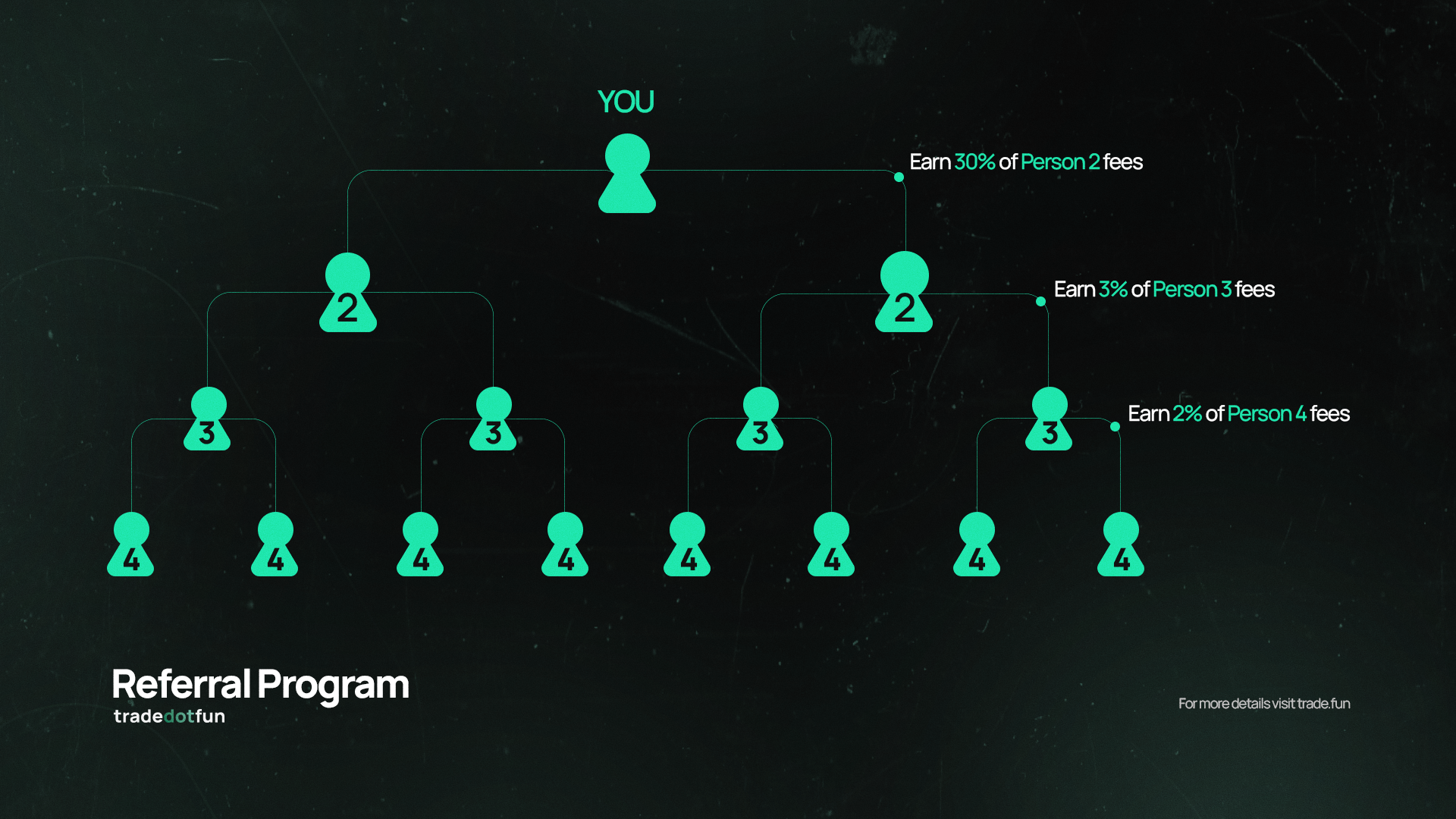
**trade**<mark style="color:$primary;">**dot**</mark>**fun** mirrors the proven 3-tier structure used by other platforms:

| Level   | Who qualify?                           | Your Commission            |
| ------- | -------------------------------------- | -------------------------- |
| Level 1 | Direct sign-ups via your referral link | 30% of fees on every trade |
| Level 2 | Users referred by your level 1 traders | 3% of fees of every trade  |
| Level 3 | Users referred by your level 2 traders | 2% of fees on every trade  |

Example Flows:

1. You invite Alice (Level 1). Alice trades $10,000
   1. Standard fee = $10,000 x 1% = $100
   2. Your cut (30%) = $30
2. Alice invites Bob (Level 2). Bob trades $10,000
   1. Your level 2 cut (3%) = $3
   2. Alice earns level 1 cut (30%) = $30
3. Bob invites Charlie (Level 3). Charlie trades $10,000
   1. Your level 3 cut (2%) = $2
   2. Alice gets level 2 cut (3%) = $3
   3. Bob earns level 1 cut (30%) = $30

### Key Details

* **Unlimited earnings:** There is no cap on how many users you can refer or how much you can earn.
* **Real-time Dashboard:** Track sign-ups and earnings inside the rewards tab.
* **Frequent Payouts:** Rewards accumulate block by block and can be claimed at any time.

#### Getting Started

1. Copy your **Referral Link** from the dashboard.
2. Share it with friends, followers, or your community.
3. Watch your revenue share grow as they trade!


# Fees

We keep fees simple, transparent and designed to reward active users – especially those who hold <mark style="color:$primary;">**$TRADE**</mark>.

Two things shape your fees and rewards on tradedotfun:

* <mark style="color:$primary;">**$TRADE**</mark>**&#x20;Unlocks** — the more $TRADE you hold, the bigger your fee discount and point multiplier.
* **Tier Unlocks** — the more you trade, the higher your tier and the more cashback you get.

They work independently, so your tier isn't tied to your <mark style="color:$primary;">**$TRADE**</mark> balance.

***

### Base fees

**Memecoin trading**

* Base fee: **1%** per trade (industry standard).
* Applies to all buys and sells through on-chain memecoin pairs.

**Perps & Spot**

* Base fee: **0.01%** per trade.
* Applies to all trades executed via Hyperliquid Hypercore.

Every trade is eligible for both a fee discount (from <mark style="color:$primary;">**$TRADE**</mark> held) and cashback (from your tier).

***

#### Fee discount — from holding <mark style="color:$primary;">$TRADE</mark>

| $TRADE Held | Fee Discount |
| ----------- | ------------ |
| Free        | -            |
| 10,000      | 5%           |
| 50,000      | 15%          |
| 100,000     | 25%          |
| 250,000     | 35%          |

The discount applies to the base fee before cashback is calculated.

***

#### Cashback — from your tier

| Tier    | Cashback |
| ------- | -------- |
| Starter | 15%      |
| Bronze  | 20%      |
| Silver  | 25%      |
| Gold    | 30%      |
| Diamond | 35%      |

Tiers are earned by trading. See the [Rewards page](/getting-started/rewards/rewards-page).

> Example: A user holding **100,000 $TRADE** at **Gold tier** makes a **$1,000 memecoin trade**.
>
> 1. Base fee: 1% → **$10.00**
> 2. Fee discount from $TRADE (25%): $10.00 − $2.50 → **$7.50 paid**
> 3. Cashback from Gold tier (30% of $7.50): **$2.25 returned**
> 4. Net effective fee: **$5.25** (≈0.53%)

***

**The more&#x20;**<mark style="color:$primary;">**$TRADE**</mark>**&#x20;you hold and the more you trade, the less you pay —  and the more you earn back.**

Fees fuel daily buybacks, point rewards and the continued growth of the **trade**<mark style="color:$primary;">**dot**</mark>**fun** platform.


# Rewards


# Rewards Page

Earn points and cashback by completing trading activities and quests, and claim your rewards in one place.

<figure><img src="https://2688198036-files.gitbook.io/~/files/v0/b/gitbook-x-prod.appspot.com/o/spaces%2FhntkAx0dqGAXIejmltGN%2Fuploads%2FKZgJsQ8HgI5Wh1F24w5u%2Fimage.png?alt=media&amp;token=c12a826f-59ed-4657-85e1-3a2ee4731eaf" alt=""><figcaption><p>Rewards Page</p></figcaption></figure>

***

Whenever you perform an action on **trade**<mark style="color:$primary;">**dot**</mark>**fun** — trade spot, trade perps, trade memecoins, copy trade, or stake to earn yield — you earn **points in real-time**. You'll want to keep stacking those 😉. 75% of everything goes right back to the community.

While seasonal points reset, **lifetime points never disappear** — they unlock **permanent tier bonuses**.&#x20;

Tiers give you an **immediate fee discount**, ongoing **points multipliers**, **beta product features**, and a **direct line to the team behind it all**.

## Follow these steps to earn and claim rewards

{% stepper %}
{% step %}

### Check Your Stats

View your current status:

* <mark style="color:$primary;">**$TRADE**</mark> balance
* Points
* Tier level
* Cashback rate
* Unclaimed rewards
  {% endstep %}

{% step %}

### Complete Quests

Earn points by completing tasks:

* Daily quests (trading, volume, login, etc.)
* Trading challenges (milestones, consistency, big trades)
  {% endstep %}

{% step %}

### Track Boosts

Monitor active boosts that increase your rewards (if available).
{% endstep %}

{% step %}

### Claim Rewards

Go to the **Claim Rewards** panel:

* Claim accumulated points
* Check available cashback
  {% endstep %}

{% step %}

### Increase Earnings

Hold more <mark style="color:$primary;">**$TRADE**</mark> to raise your multiplier and fee discount. Trade more to climb tiers and raise your cashback.
{% endstep %}
{% endstepper %}

***

## Two ways to earn

#### <mark style="color:$primary;">**$TRADE**</mark> **Unlocks — based on how much you hold**

The more <mark style="color:$primary;">**$TRADE**</mark> you hold, the bigger your point multiplier, fee discount, and product access.

| $TRADE Held | Points | Fee Discount | Perks                                                            |
| ----------- | ------ | ------------ | ---------------------------------------------------------------- |
| Free        | 1x     | -            | -                                                                |
| 10,000      | 1.2x   | 5%           | -                                                                |
| 50,000      | 1.5x   | 15%          | Advanced Features + Competitions                                 |
| 100,000     | 2x     | 25%          | Early Access + Direct team access + Competitions & much more     |
| 250,000     | 2.5x   | 35%          | Early Access + Features built for you + Competitions & much more |

#### Tier Unlocks — based on points you earn

The more you trade, the higher your tier — and the more cashback you get. Your tier is independent of your <mark style="color:$primary;">**$TRADE**</mark> balance.

<table><thead><tr><th width="121.4921875">Tier</th><th width="130.04296875">Cashback</th><th>Perks</th></tr></thead><tbody><tr><td><strong>Starter</strong></td><td>15%</td><td>Standard support</td></tr><tr><td><strong>Bronze</strong></td><td>20%</td><td>Enhanced support</td></tr><tr><td><strong>Silver</strong></td><td>25%</td><td>Priority support</td></tr><tr><td><strong>Gold</strong></td><td>30%</td><td>Direct team access + Competitions</td></tr><tr><td><strong>Diamond</strong></td><td>35%</td><td>Direct team access + Competitions + Features built for you</td></tr></tbody></table>

**Earn points by trading. More points = higher tier = better conditions.**

> A bigger <mark style="color:$primary;">**$TRADE**</mark> stash means a bigger multiplier, which means you earn points faster and climb tiers quicker. Two separate systems — but playing both wins bigger.

***

## Token Incinerator

Turn dust into SOL. The Token Incinerator lets you reclaim SOL locked up in zero-value token accounts by closing them in a single click.

<figure><img src="https://2688198036-files.gitbook.io/~/files/v0/b/gitbook-x-prod.appspot.com/o/spaces%2FhntkAx0dqGAXIejmltGN%2Fuploads%2F01BAzQJP8YQYvYnPLZZt%2FClipboard-20260413-020517-496.gif?alt=media&amp;token=3c88c617-bd10-4343-b5c8-a4cec832a46e" alt=""><figcaption><p>Token Incinerator Feature</p></figcaption></figure>

Every token account on Solana requires a small amount of SOL as rent. Once you've sold a token or it's gone to zero, that rent SOL is still sitting there — unused but recoverable. The Incinerator scans your wallet for these dust accounts and lets you burn them all at once to reclaim the SOL.

#### **How to use it:**

{% stepper %}
{% step %}

### **Select a wallet**

Pick the wallet you want to clean up.
{% endstep %}

{% step %}

### **Review dust accounts**

The incinerator automatically lists all eligible zero-balance token accounts.
{% endstep %}

{% step %}

### **Hit Incinerate All**

Burns all selected accounts in one transaction and returns the rent SOL straight to your wallet.
{% endstep %}
{% endstepper %}


# Refferals Page

Earn rewards by sharing your referral link and tracking your earnings and activity.

<figure><img src="https://2688198036-files.gitbook.io/~/files/v0/b/gitbook-x-prod.appspot.com/o/spaces%2FhntkAx0dqGAXIejmltGN%2Fuploads%2FaojjXWuGUgNKmD4ILDFU%2Fscreencapture-trade-fun-rewards-2026-03-28-22_25_03.png?alt=media&amp;token=e80dd3d2-4b01-4d4d-bae3-3d3d07a4765e" alt=""><figcaption><p>Referrals Page</p></figcaption></figure>

<figure><img src="https://2688198036-files.gitbook.io/~/files/v0/b/gitbook-x-prod.appspot.com/o/spaces%2FhntkAx0dqGAXIejmltGN%2Fuploads%2FC88i7wWbTTUqGxaCywRt%2Fscreencapture-trade-fun-2026-03-29-23_27_16-edit.png?alt=media&amp;token=2e289ace-0c5f-4dd8-bcd0-e1a56ed93c47" alt=""><figcaption><p>Refer &#x26; Earn More</p></figcaption></figure>

***

{% stepper %}
{% step %}

### Get Your Referral Link

Copy your unique link and share it with others.
{% endstep %}

{% step %}

### Invite Users

Share your link to onboard new users and earn rewards from their activity.
{% endstep %}

{% step %}

### Earn Rewards

Receive a percentage of trading fees based on your referral tier:

Direct referrals **(L1) earn you 30+%**, their referrals **(L2) earn you 3+%**, and the next level down **(L3) earns you 2+%**.
{% endstep %}

{% step %}

### Track Performance

Monitor:

* Number of referrals
* Network (tiers)
* Total earned
* Referral volume
  {% endstep %}

{% step %}

### View Referrals List

See all users who joined via your link and their activity.
{% endstep %}
{% endstepper %}


# Buybacks

<figure><img src="https://2688198036-files.gitbook.io/~/files/v0/b/gitbook-x-prod.appspot.com/o/spaces%2FhntkAx0dqGAXIejmltGN%2Fuploads%2FCJLbpwTbZosQVWRRRmmu%2Fimage.png?alt=media&amp;token=d61e5c0f-cd13-4a50-be0b-630ed39f5f55" alt=""><figcaption></figcaption></figure>

The **Buybacks** page provides real-time transparency into the $TRADE token economy.\
It allows you to:

* **Track Live Supply:** View the total token supply and its distribution across pools.
* **Monitor Treasury Activity:** See how the Treasury Fund allocates tokens for buybacks and rewards.
* **View Token Distribution:** Breakdown of circulating supply, rewards pool, team allocation, and burned tokens.
* **Follow Buyback Metrics:** Real-time updates on market cap, fully diluted value, and buyback treasury levels.
* **Analyze Performance:** Compare daily rewards and trading volume over time with live charts.


# Deposits & Withdrawals


# Deposits

**trade**<mark style="color:$primary;">**dot**</mark>**fun** supports fast, flexible deposits across multiple networks – whether you’re here to **snipe memecoins**, **trade perps/spot on Hyperliquid**, or **bid on Prediction Markets**.

<figure><img src="https://2688198036-files.gitbook.io/~/files/v0/b/gitbook-x-prod.appspot.com/o/spaces%2FhntkAx0dqGAXIejmltGN%2Fuploads%2FuPLx72P3N2OLeoSGWUic%2FClipboard-20260328-000851-744.gif?alt=media&amp;token=3a86a6c0-c4a9-4b81-bb75-1f7185a94118" alt=""><figcaption><p>Deposit action</p></figcaption></figure>

***

#### Depositing to **Memecoins Account**

* **Network:** **Solana only**
* You can deposit **SOL, FARTCOIN, or any other supported Solana-based tokens** directly into your memecoin wallet.

> This is an on-chain wallet – perfect for trading Solana memecoins in real time.

<figure><img src="https://2688198036-files.gitbook.io/~/files/v0/b/gitbook-x-prod.appspot.com/o/spaces%2FhntkAx0dqGAXIejmltGN%2Fuploads%2Fz9YfoLNhpzV6b9W3mX9h%2Fscreencapture-trade-fun-account-management-2026-03-28-00_55_42-edit%20(3).png?alt=media&amp;token=17af9dc6-5c06-4d50-abe3-b04f97aabe13" alt="" width="563"><figcaption><p>Memecoin Deposit</p></figcaption></figure>

***

#### Depositing to **Perps/Spot (Hyperliquid) Account**

To fund your perp trading account, you can deposit using any of the following assets via their native networks:

| Network  | Token                      |
| -------- | -------------------------- |
| Arbitrum | USDC                       |
| Solana   | <p>• SOL<br>• FARTCOIN</p> |
| Bitcoin  | BTC                        |
| Ethereum | ETH                        |

> **Note for USDC on Arbitrum:**\
> To send USDC to Hyperliquid, you’ll need a small amount of **ETH in your wallet** to cover gas fees. We recommend transferring at least **$1 worth of ETH** before depositing USDC.

<figure><img src="https://2688198036-files.gitbook.io/~/files/v0/b/gitbook-x-prod.appspot.com/o/spaces%2FhntkAx0dqGAXIejmltGN%2Fuploads%2F2cbyLyiVEC6iHKDfWeGY%2Fscreencapture-trade-fun-account-management-2026-03-28-01_08_18-edit.png?alt=media&amp;token=a7830c1c-e725-4d40-9ba3-3b6bfa572b3c" alt="" width="563"><figcaption><p>Leverage/Spot Deposit</p></figcaption></figure>

***

### Depositing to Prediction Markets Account

To fund your prediction markets account, you can deposit using any of the supported assets through their native networks.

{% hint style="info" %}
**Please note: Minimum Deposit is $5 for all the following: except Mainnet Eth which is $20.**
{% endhint %}

**Supported Networks & Tokens**

| Chain                     | Token                               |
| ------------------------- | ----------------------------------- |
| Solana                    | <p>• SOL<br>• USDC<br>• USDT</p>    |
| Ethereum                  | <p>• ETH<br>• USDC<br>• USDT</p>    |
| Arbitrum                  | <p>• USDC<br>• USDT</p>             |
| Base                      | <p>• USDC<br>• USDT</p>             |
| Polygon                   | <p>• USDC<br>• USDC.e<br>• USDT</p> |
| BSC (Binance Smart Chain) | <p>• BNB<br>• USDC<br>• USDT</p>    |

<figure><img src="https://2688198036-files.gitbook.io/~/files/v0/b/gitbook-x-prod.appspot.com/o/spaces%2FhntkAx0dqGAXIejmltGN%2Fuploads%2Fol5moXe5NYZm5eQQYwYh%2Fscreencapture-trade-fun-account-management-2026-04-20-11_17_58-edit%20(1).png?alt=media&amp;token=1efd9fd2-0f88-46a0-ab36-6bec2acbeda9" alt="" width="563"><figcaption><p>Prediction Market Deposit</p></figcaption></figure>

#### Seamless Transfers Between Accounts

If you're already holding funds in your **Memecoins account**, you can easily **transfer them to your Perps account** with just a few clicks. You can also transfer from your **Perps account** to **Prediction Markets account**. No need to withdraw or bridge – we make it fast and frictionless.

***

Need help? [Support](/getting-started/support)


# Withdrawals

Taking your funds off **trade**<mark style="color:$primary;">**dot**</mark>**fun** is simple, fast and flexible. Whether you're trading memecoins or perps, you stay in control.

<figure><img src="https://2688198036-files.gitbook.io/~/files/v0/b/gitbook-x-prod.appspot.com/o/spaces%2FhntkAx0dqGAXIejmltGN%2Fuploads%2F0AsXmw91xMSGUpUx1Fye%2FClipboard-20260328-002553-941.gif?alt=media&amp;token=19104d53-9d1e-4731-ad61-7389a64f45c4" alt=""><figcaption><p>Withdrawal Action</p></figcaption></figure>

***

#### Withdrawing from **Memecoins**

* You can withdraw **any amount of SOL** from your memecoin wallet to **any Solana address**.
* Support for other Solana token withdrawals (like FARTCOIN, USDC, etc.) is **coming soon**.

> **Reminder:** If you saved your private key during wallet setup, you can always access and use your funds independently – Trade.fun is fully non-custodial.

<figure><img src="https://2688198036-files.gitbook.io/~/files/v0/b/gitbook-x-prod.appspot.com/o/spaces%2FhntkAx0dqGAXIejmltGN%2Fuploads%2FjdFcAwxPeyr1zD5Lyln3%2Fscreencapture-trade-fun-account-management-2026-03-28-01_49_12-edit.png?alt=media&amp;token=d74e9a5c-083a-47d9-a163-28dce5e559b7" alt="" width="563"><figcaption><p>Withdrawal Memecoins account</p></figcaption></figure>

***

#### Withdrawing from **Perps (Hyperliquid)**

You can withdraw **any of the tokens supported for deposit**, including:

* **USDC (Arbitrum)**
* **SOL (Solana)**
* **FARTCOIN (Solana)**
* **BTC (Bitcoin)**
* **ETH (Ethereum)**

Withdrawals go directly to your wallet on the corresponding network – no delays on our end, no extra steps.

<figure><img src="https://2688198036-files.gitbook.io/~/files/v0/b/gitbook-x-prod.appspot.com/o/spaces%2FhntkAx0dqGAXIejmltGN%2Fuploads%2F63RgkWc4XmufEBCYnIfa%2Fscreencapture-trade-fun-account-management-2026-03-28-01_51_33-edit.png?alt=media&amp;token=b2545412-0a1c-4ab5-bfde-06c86435fbbf" alt="" width="563"><figcaption><p>Withdrawal Leverage/Spot account</p></figcaption></figure>

#### Withdrawing from Prediction Markets

* **You can withdraw USDC.e (Polygon Network)**

<figure><img src="https://2688198036-files.gitbook.io/~/files/v0/b/gitbook-x-prod.appspot.com/o/spaces%2FhntkAx0dqGAXIejmltGN%2Fuploads%2FynRHuVPL73SqqhyRc5Qv%2Fimage.png?alt=media&amp;token=a71843df-0a82-42ec-bc6b-6f8aa14ccb72" alt="" width="563"><figcaption><p>Withdrawal Prediction account</p></figcaption></figure>

***

**Your funds. Your wallet. Your control.**\
We just make it easier and faster to use.

***

Need help? [Support](/getting-started/support)


# Transfer

Transfer money between your Accounts.

<figure><img src="https://2688198036-files.gitbook.io/~/files/v0/b/gitbook-x-prod.appspot.com/o/spaces%2FhntkAx0dqGAXIejmltGN%2Fuploads%2FIOBkSbZ01b0HWrzVZTB7%2Fscreencapture-trade-fun-account-management-2026-03-28-01_58_46-edit%20(1).png?alt=media&amp;token=d621dafc-3c4d-47eb-ad77-8b3ca5e58100" alt="" width="563"><figcaption><p>Manage your funds</p></figcaption></figure>

You can transfer **SOL** between your **Memecoin**, **Leverage/Spot** and **Prediction** wallets – all within the same place.&#x20;

{% hint style="info" %}
**Please note: Minimum Amount to transfer is .2 SOL**
{% endhint %}

* **From Account:** Choose the wallet you want to move funds out of (e.g., Memecoins).
* **To Account:** Select the destination wallet (e.g., Leverage/Spot or **Prediction/Market**).
* **Select Wallet:** Pick which connected wallet to use for the transfer.
* **Transfer Amount:** Enter the amount of SOL you want to move.

{% hint style="info" %}
**Small network fees may apply when transferring between accounts.**
{% endhint %}


# Homepage

Homepage gives you a full market snapshot at a glance – trending tokens, major asset prices, 24h platform activity and your live portfolio breakdown all in one dashboard.

<figure><img src="https://2688198036-files.gitbook.io/~/files/v0/b/gitbook-x-prod.appspot.com/o/spaces%2FhntkAx0dqGAXIejmltGN%2Fuploads%2F9rZb9DPCUmGTurFfwrvE%2FScreenshot%202026-02-12%20at%207.02.41%E2%80%AFPM.png?alt=media&amp;token=f78cb457-fe08-45c6-8a3d-f82a6d14fa0b" alt=""><figcaption></figcaption></figure>

### Homepage Overview

The **trade**<mark style="color:$primary;">**dot**</mark>**fun** homepage gives users a clear, real-time snapshot of the Solana market and their personal trading activity. It **highlights key metrics**, **trending tokens** and **portfolio information** in one place.

#### Market Metrics

The top of the homepage displays essential data from the last 24 hours and the past week, including:

* 24h volume
* Active traders
* 24h overview of market movement
* 7-day average trends
* 24h market activity feed showing buys, sells and new token activity

These metrics update continuously to help traders understand overall market conditions at a glance.

#### Trending Tokens

This section highlights the **most active tokens** on Solana based on **trading activity**, **volume** and **momentum**. It helps traders quickly identify tokens that are moving or gaining attention.

#### Portfolio Panel

Users can view their current portfolio directly from the homepage. The panel includes:

* Total portfolio value
* Individual token holdings
* Profit and loss
* A portfolio breakdown chart to show asset distribution

This provides a quick overview of personal performance without leaving the page.

#### Favorites

Users can save tokens they want to keep track of. The **Favorites** section shows **updated prices**,   **24h changes** and **quick access** to charts and trading actions for the tokens they have marked.

#### Major Assets

The homepage also features a section for major assets on Solana. It can be viewed in either a heat map or a grid:

* The heat map shows performance strength based on color and size.

<figure><img src="https://2688198036-files.gitbook.io/~/files/v0/b/gitbook-x-prod.appspot.com/o/spaces%2FhntkAx0dqGAXIejmltGN%2Fuploads%2F97Mu4oJpqxAMCwy6id40%2Fimage.png?alt=media&amp;token=3decdf41-0f41-4a54-b873-62ca93b7be76" alt=""><figcaption><p>Major Assets — Heat Map </p></figcaption></figure>

* The grid view lists price, 24h movement and activity in a more traditional layout.

<figure><img src="https://2688198036-files.gitbook.io/~/files/v0/b/gitbook-x-prod.appspot.com/o/spaces%2FhntkAx0dqGAXIejmltGN%2Fuploads%2FW2JhPzRw4blhv7SWVZCk%2Fimage.png?alt=media&amp;token=055bd321-b5c3-4d88-9cc8-21141d66db04" alt=""><figcaption><p>Major Assets — Grid View</p></figcaption></figure>

Both views make it easy to scan the market and understand how key assets are performing.

### How to Access the Homepage

Accessing the **trade**<mark style="color:$primary;">**dot**</mark>**fun** homepage is straightforward.&#x20;

No matter where you are on the platform, you can return to the main dashboard at any time by clicking the **trade**<mark style="color:$primary;">**dot**</mark>**fun logo** at the top of the site.&#x20;

This will always take you back to the homepage where you can view **market metrics**, **trending tokens** and your **portfolio overview**.


# Finding Tokens

### Discover Pages

{% columns %}
{% column %}

{% content-ref url="/pages/zRpjmCgW1seqjKb8Icbi" %}
[Discover](/memecoins/finding-tokens/discover)
{% endcontent-ref %}
{% endcolumn %}

{% column %}

{% endcolumn %}
{% endcolumns %}

### Memescope Pages

{% columns %}
{% column %}

{% content-ref url="/pages/CEhfMqHBM6bOwtISmwFo" %}
[Memescope](/memecoins/finding-tokens/memescope)
{% endcontent-ref %}

{% content-ref url="/pages/NDvWnqIwdWY3SUHWJKNE" %}
[Blacklist](/memecoins/finding-tokens/memescope/blacklist)
{% endcontent-ref %}

{% content-ref url="/pages/AvuzkEp3DY1ABMz0F5MC" %}
[Token Search](/memecoins/finding-tokens/token-search)
{% endcontent-ref %}

{% content-ref url="/pages/MZn2oOsHcVaeHUDWnCDw" %}
[Memescope Icons](/memecoins/finding-tokens/memescope/memescope-icons)
{% endcontent-ref %}
{% endcolumn %}

{% column %}

{% content-ref url="/pages/JVIScrZdfop3QWTS2K6a" %}
[Memescope Filters](/memecoins/finding-tokens/memescope/memescope-filters)
{% endcontent-ref %}

{% content-ref url="/pages/MZn2oOsHcVaeHUDWnCDw" %}
[Memescope Icons](/memecoins/finding-tokens/memescope/memescope-icons)
{% endcontent-ref %}

{% content-ref url="/pages/S2uvZhAWVPAPgWtZ1qyA" %}
[Memescope Layouts & Display](/memecoins/finding-tokens/memescope/memescope-layouts-and-display)
{% endcontent-ref %}

{% content-ref url="/pages/kNdPSXQIAItq8Cddpgsm" %}
[Memescope Notifications](/memecoins/finding-tokens/memescope/memescope-notifications)
{% endcontent-ref %}
{% endcolumn %}
{% endcolumns %}


# Discover

The Discover page gives you a real-time, sortable feed of trending tokens, helping you identify high-velocity trades, growing projects and social momentum – all at a glance.

<figure><img src="https://2688198036-files.gitbook.io/~/files/v0/b/gitbook-x-prod.appspot.com/o/spaces%2FhntkAx0dqGAXIejmltGN%2Fuploads%2FZ9tMFu1i61b4xxVtBwJz%2FClipboard-20260417-012137-655.gif?alt=media&amp;token=32d73c9e-8c0f-40b6-8861-51d44232b54d" alt=""><figcaption><p>Discover Page</p></figcaption></figure>

{% tabs %}
{% tab title="Trending" %}

<figure><img src="https://2688198036-files.gitbook.io/~/files/v0/b/gitbook-x-prod.appspot.com/o/spaces%2FhntkAx0dqGAXIejmltGN%2Fuploads%2Fk6rcveZpinDs2dISM7r2%2Fimage.png?alt=media&amp;token=0051d8b0-0626-4d37-8c94-b3a2ecd77cb7" alt=""><figcaption><p>Trending Section</p></figcaption></figure>

The Trending page highlights the most active pump.fun tokens based on real-time market activity. It helps you identify where liquidity, volume, and user attention are currently concentrated.

Each token includes:

* **Price trend preview** – recent movement at a glance
* **Market Cap & ATH** – current value vs historical peak
* **Liquidity** – depth and stability of trading
* **Volume** – recent trading activity and demand
* **Transactions (TXNS)** – buy/sell activity breakdown
* **Audit Log** – key indicators like fees, distribution, and safety metrics

Additional features:

* **Timeframe filters (5m, 1h, 6h, 24h)** to track short-term trends
* **Sorting & filtering tools** for better discovery
* **Quick Buy option** for fast execution
  {% endtab %}

{% tab title="Dex" %}

<figure><img src="https://2688198036-files.gitbook.io/~/files/v0/b/gitbook-x-prod.appspot.com/o/spaces%2FhntkAx0dqGAXIejmltGN%2Fuploads%2FeRlsUGsjoRRHMvOobSZD%2Fimage.png?alt=media&amp;token=1afc3276-d5f7-4fdb-86f1-94d63ada5b0e" alt=""><figcaption><p>Dex Screener Page</p></figcaption></figure>

The Dex Screener page showcases tokens that have paid for DEX Screener listing and are actively trading on decentralized exchanges. It provides a detailed, data-rich view to help you evaluate token performance and market activity.

Each row includes:

* **Price chart preview** — quick visual of the recent trend.
* **Market Cap & ATH** — current valuation and all-time high.
* **Liquidity** — available trading depth and stability.
* **Volume** — recent trading activity.
* **Transactions (TXNS)** — buy/sell counts and activity balance.
* **Audit Log** — key indicators like fees, distribution, and safety metrics.

Additional features:

* Filter by timeframe (**5m, 1h, 6h, 24h**) to focus on different windows.
* Sort and filter tokens based on your preferences.
* Hit the **Buy** button to trade instantly without leaving the page.
  {% endtab %}

{% tab title="Pump Live" %}

<figure><img src="https://2688198036-files.gitbook.io/~/files/v0/b/gitbook-x-prod.appspot.com/o/spaces%2FhntkAx0dqGAXIejmltGN%2Fuploads%2FNelXVRLDroZaMeLACZav%2Fimage.png?alt=media&amp;token=3523a9c3-8367-4c71-aa42-0fccb4ba6992" alt=""><figcaption><p>Pump Live Section</p></figcaption></figure>

Pump Live gives you a front-row seat to real-time streams happening on Pump.fun — watch communities form, devs interact, and hype build as it happens.

Each card shows:

* **Live video or content preview** — see the stream directly.
* **Viewer count** — how many people are watching right now.
* **Token info** — name, market cap, and basic details.
* **Recent activity** — comments, timestamps, and engagement.
* **Quick Buy** — trade instantly without leaving the stream view.

You can also:

* Sort by **DESC** (newest/most active first) or **ASC** (oldest first).
* Monitor which tokens have active communities behind them.
* Follow developers or creators engaging live with their audience.
  {% endtab %}

{% tab title="Filters" %}

<figure><img src="https://2688198036-files.gitbook.io/~/files/v0/b/gitbook-x-prod.appspot.com/o/spaces%2FhntkAx0dqGAXIejmltGN%2Fuploads%2FxOrwocOOSaPbma3jLIew%2Fimage.png?alt=media&amp;token=12fd71e7-ccfb-4a2e-ac19-3278485e7c06" alt="" width="375"><figcaption><p>Discover Page Filters</p></figcaption></figure>

Customize what shows up across the Discover page with the Filters panel. These filters apply to **Trending**, **Dex**, and **Gainers** tabs.

* **Search Keywords** — Only show tokens that match specific keywords.
* **Exclude Keywords** — Hide tokens that match any excluded keyword.
* **Dex Paid** — Toggle to show only tokens that have paid for Dexscreener listing.
* **Top 10 Holders %** — Set a min/max range for top holder concentration.
* **Liquidity ($)** — Filter by minimum and maximum liquidity.
* **Volume ($)** — Filter by minimum and maximum trading volume.
* **Market Cap ($)** — Filter by minimum and maximum market cap.
* **Txns** — Filter by transaction count.
* **Fees (SOL)** — Filter by total fees collected.
* **Holder Count** — Filter by number of holders.

Hit **Apply** to save your filters or **Reset** to clear everything and start fresh.
{% endtab %}
{% endtabs %}


# Memescope

Memescope tracks token lifecycles from their earliest moments through full launch. Use it to spot early opportunities, momentum trades, and migration-based plays.

<figure><img src="https://2688198036-files.gitbook.io/~/files/v0/b/gitbook-x-prod.appspot.com/o/spaces%2FhntkAx0dqGAXIejmltGN%2Fuploads%2FsQhYwcf27zZUxLnOfIVu%2FScreenshot%202026-02-12%20at%207.04.33%E2%80%AFPM.png?alt=media&amp;token=3f40caac-0125-491f-a82e-6ed2f45b98a6" alt=""><figcaption><p>Memescope page</p></figcaption></figure>

{% tabs %}
{% tab title="New Pairs" %}
These are freshly launched token pairs on supported platforms like **Raydium**, **Pump.fun**, **Meteora** and others.

* The clock starts as soon as the token is **available on-chain**.
* These are the **earliest and riskiest** entries – often before bots, influencers, or Crypto Twitter (CT) catch on.
* Ideal for traders looking for **ultra-early alpha** with high-risk/high-reward potential.
  {% endtab %}

{% tab title="Final Stretch" %}
Tokens in this category have reached **over 70% of their bonding curve**.

* Liquidity begins ramping up fast as final curve entries occur.
* This phase is the **last window** before full AMM launch.
* Great for **momentum-based entries** or **final push trades** before mass exposure.
  {% endtab %}

{% tab title="Migrated" %}
Tokens that have completed **100% of their bonding curve** and are now either **migrating to or already listed on AMMs** such as Raydium.

* This is the stage of **open price discovery** and **high volatility**.
* Ideal for traders looking to capitalize on **early LP formation, swings,** and **arbitrage** opportunities.
  {% endtab %}

{% tab title="Top Right Settings" %}
In the top-right corner of the Memescope interface, you’ll find several settings icons that control how this page behaves:

* **Quick Buy Settings**\
  Configure your **default buy amount** for rapid entries directly from Memescope.
* **Blacklisted Items (Chef Hat Icon)**\
  Access your personal blacklist to **filter out unwanted devs, contracts, keywords,** or **projects**.
* **Snipe Settings (Arrow on Target Icon)**\
  Adjust your sniping logic for **automated** or **fast-tracked entries**, ideal for catching high-speed launches.
* **Layout Settings (Gear Icon)**\
  Customize the **visual layout and density** of the Memescope page to match your workflow or screen preferences.
  {% endtab %}
  {% endtabs %}

***

Let us know if you'd like a diagram of the icons or embedded tooltips for each setting:

[Support](/getting-started/support)


# Memescope Filters

Use the Filters panel to customize your feed based on your trading preferences. You can filter by protocol, keywords, metrics, audits, social presence and more.

<figure><img src="https://2688198036-files.gitbook.io/~/files/v0/b/gitbook-x-prod.appspot.com/o/spaces%2FhntkAx0dqGAXIejmltGN%2Fuploads%2F4ZtY5zY6C6wvbxLEq6IC%2FClipboard-20260328-005314-654.gif?alt=media&amp;token=bf138368-6937-4082-91e3-8a1245c56767" alt=""><figcaption><p>Memescope Filters Panel</p></figcaption></figure>

### Recommended Settings

New to Memescope? Hit **Apply** on the Recommended Settings popup to get started with a curated filter setup.&#x20;

This pre-selects trusted protocols like Pump and Bonk, filters out low-quality tokens, and keeps your display clean — so you can focus on what matters right away.&#x20;

You can always customize these later.

<figure><img src="https://2688198036-files.gitbook.io/~/files/v0/b/gitbook-x-prod.appspot.com/o/spaces%2FhntkAx0dqGAXIejmltGN%2Fuploads%2FdF6w12jAmsX3Y2vQwIkR%2FClipboard-20260330-181419-225.gif?alt=media&amp;token=4792849c-2adc-490d-b869-bef5875c00f4" alt=""><figcaption><p>Recommended Settings Applied</p></figcaption></figure>

***

### **Protocol Selection**

At the top of the panel, select which platforms to include:

* **Supported protocols**: Pump, Bonk, Bags, Raydium, Meteora, Moonshot and more.

You can mix and match protocols or focus on a single one.

***

### Keyword Filters

* **Search Keywords**: Show only tokens that include specific keywords.
* **Exclude Keywords**: Hide tokens that match any excluded keyword.

This is useful for filtering out spam, trends you’re not interested in, or surfacing niche plays.

***

### Bonding Curve %

{% hint style="info" %}
Only available for New Pairs & Final Stretch.
{% endhint %}

Filter tokens by how far along they are in the bonding curve phase (0–100%). Useful for targeting early or late-stage opportunities in pre-launch phases.

***

### Want to go deeper? Explore each filter tab in detail:

{% columns %}
{% column %}

{% content-ref url="/pages/AhbBnRuKM5N2rmuWat8Q" %}
[Audit Filters](/memecoins/finding-tokens/memescope/memescope-filters/audit-filters)
{% endcontent-ref %}

{% content-ref url="/pages/lCJWcqLtaXy9xw8r9i3z" %}
[Socials Tab Filters](/memecoins/finding-tokens/memescope/memescope-filters/socials-tab-filters)
{% endcontent-ref %}
{% endcolumn %}

{% column %}

{% content-ref url="/pages/Yp5jBo5mxZdEMGzGUaHF" %}
[Metrics Filters](/memecoins/finding-tokens/memescope/memescope-filters/metrics-filters)
{% endcontent-ref %}

{% content-ref url="/pages/EueRsNUF73zGwJ6HMbAQ" %}
[Time Based Filters](/memecoins/finding-tokens/memescope/memescope-filters/time-based-filters)
{% endcontent-ref %}
{% endcolumn %}
{% endcolumns %}


# Audit Filters

<figure><img src="https://2688198036-files.gitbook.io/~/files/v0/b/gitbook-x-prod.appspot.com/o/spaces%2FhntkAx0dqGAXIejmltGN%2Fuploads%2F4E2t2HMvUdnn3zxLdynR%2Fimage.png?alt=media&amp;token=2035db41-6aed-4f40-ae98-c1781f649b0a" alt="" width="375"><figcaption><p>Audit Tab</p></figcaption></figure>

* `Dex Paid`: Tokens where the DEX listing fee has been paid (Pump-specific).
* `CA Ends in Pump`: Tokens whose contract address ends with “pump” (common safety signal in Pump launches).
* #### Holder & Behavior Filters

  You’ll also find advanced targeting options such as:

  * **Age (mins)**
  * **Top 10 Holders %**
  * **Dev Holding %**
  * **Snipers %**
  * **Insiders %**
  * **Bundle %**
  * **Holder Count**
  * **Dev Migrations**

  Each supports min/max values to help you fine-tune your risk profile.


# Metrics Filters

<figure><img src="https://2688198036-files.gitbook.io/~/files/v0/b/gitbook-x-prod.appspot.com/o/spaces%2FhntkAx0dqGAXIejmltGN%2Fuploads%2FqIAmgF8yqsgi61Gmuh74%2Fimage.png?alt=media&amp;token=d24b41bc-5c6d-4b3f-be0f-87f1fdb34fbe" alt="" width="375"><figcaption><p>Metrics Tab</p></figcaption></figure>

Target specific performance thresholds:

* **Liquidity ($)**
* **Volume ($)**
* **Market Cap ($)**
* **Transactions**
* **Number of Buys / Sells**

You can set min/max values for each to surface tokens within your desired range.


# Socials Tab Filters

<figure><img src="https://2688198036-files.gitbook.io/~/files/v0/b/gitbook-x-prod.appspot.com/o/spaces%2FhntkAx0dqGAXIejmltGN%2Fuploads%2Fd8NNAVf1nD2s3KTZ0eHl%2Fimage.png?alt=media&amp;token=d86ca6a3-66dc-4e97-a257-fa3f6e39d9e0" alt="" width="375"><figcaption><p>Social Tab</p></figcaption></figure>

Find tokens based on social presence:

* Has Twitter
* Has Telegram
* Has Website
* Has At Least One Social

Great for avoiding ghost projects or for filtering tokens that have marketing momentum.


# Time Based Filters

<figure><img src="https://2688198036-files.gitbook.io/~/files/v0/b/gitbook-x-prod.appspot.com/o/spaces%2FhntkAx0dqGAXIejmltGN%2Fuploads%2FWY9OcufiPN0M5wCyg6tH%2Fimage.png?alt=media&amp;token=71486a21-6579-4cb7-9737-32a2d0be7dc9" alt="" width="375"><figcaption><p>Time Based Filters Tab</p></figcaption></figure>

The **Time Based** section lets you filter data based on activity within a selected time window, helping you identify short-term trends and spikes.

Choose the time range for calculations:

* **5m**, **15m**, **30m**, **1h**

Only one interval can be selected.

All filters support **Min** and **Max** values:

* **Buyers / Sellers** — number of unique participants
* **Buy Volume ($)** — total buy volume
* **Sell Volume ($)** — total sell volume
* **Total Volume ($)** — combined trading volume
* **Transactions** — total number of trades
* **Buys / Sells** — number of buy and sell transactions
* **Wallets** — number of unique wallets
* **Price Change (%)** — price movement over the selected period


# Blacklist

The Blacklisted Items modal lets you filter out any tokens that match specific data points. Blacklisted items are excluded from your Memescope feed for a cleaner experience.

<figure><img src="https://2688198036-files.gitbook.io/~/files/v0/b/gitbook-x-prod.appspot.com/o/spaces%2FhntkAx0dqGAXIejmltGN%2Fuploads%2FTnsNBdN7p72bF8J0zkA9%2FClipboard-20260330-224602-376.gif?alt=media&amp;token=5b1ebf07-1613-48cd-b4e3-672c72166510" alt=""><figcaption><p>Blacklist Feature</p></figcaption></figure>

<figure><img src="https://2688198036-files.gitbook.io/~/files/v0/b/gitbook-x-prod.appspot.com/o/spaces%2FhntkAx0dqGAXIejmltGN%2Fuploads%2F4vj6RikubM3Vf04DaIzV%2Fimage.png?alt=media&amp;token=279e2eb7-44af-48b5-ad4f-a37ab6955fd4" alt="" width="375"><figcaption><p>Blacklisted items</p></figcaption></figure>

### Adding to the Blacklist

To blacklist an item:

{% stepper %}
{% step %}
Select the category.
{% endstep %}

{% step %}
Enter the value (e.g., a wallet address, keyword, contract address) into the input field.
{% endstep %}

{% step %}
Click **Add.**
{% endstep %}
{% endstepper %}

You can blacklist up to **1,000 unique entries**.

***

### Filter by Type

Once added, items will be organized under specific categories:

* **Dev** – Developer wallet addresses.
* **CA** – Contract addresses.
* **Keyword** – Names or text strings that appear in token titles or descriptions.
* **Website** – Any token linked to a specific domain or URL.
* **Handle** – Token-related Twitter or Telegram handles.

Use the tabs to quickly view or manage entries under each type, or select **All** to see everything at once.

***

### Why Use This?

Blacklisting helps you:

* Avoid repeat scams or tokens from known bad actors.
* Hide themes, memes, or trends you’re not interested in.
* Customize your token discovery feed to fit your risk tolerance or preferences.


# Memescope Icons

This page provides a quick reference for icons used across the platform, helping you understand key metrics and token behaviors at a glance.


# Graduated

Indicates how many tokens were graduated by a certain developer.

<figure><img src="https://2688198036-files.gitbook.io/~/files/v0/b/gitbook-x-prod.appspot.com/o/spaces%2FhntkAx0dqGAXIejmltGN%2Fuploads%2FhByhXp69BbPeLIz1BQMw%2FClipboard-20260329-224504-281.gif?alt=media&amp;token=039ef94a-3990-436c-9b6f-7d4f58a56764" alt=""><figcaption><p>Graduated Icon Demonstration</p></figcaption></figure>

<figure><img src="https://2688198036-files.gitbook.io/~/files/v0/b/gitbook-x-prod.appspot.com/o/spaces%2FhntkAx0dqGAXIejmltGN%2Fuploads%2Fyje7y7R42CM0MmGyu77L%2Ftelegram-cloud-document-2-5352564002926928069.jpg?alt=media&amp;token=84616b80-f2c9-49f1-abd9-51a76e792a1f" alt=""><figcaption><p>Graduated Icon</p></figcaption></figure>


# Cashback Coin

These tokens return a portion of the creator’s fees back to traders. You can accumulate rewards and claim them when available.

<figure><img src="https://2688198036-files.gitbook.io/~/files/v0/b/gitbook-x-prod.appspot.com/o/spaces%2FhntkAx0dqGAXIejmltGN%2Fuploads%2Fvtw7I7eOi0vBduiLUs7c%2FClipboard-20260329-010923-003.gif?alt=media&amp;token=80f844d3-8377-4d1d-a402-e65c4da72ee8" alt=""><figcaption><p>Cashback Coin Icon Demonstration</p></figcaption></figure>

<figure><img src="https://2688198036-files.gitbook.io/~/files/v0/b/gitbook-x-prod.appspot.com/o/spaces%2FhntkAx0dqGAXIejmltGN%2Fuploads%2FQS1wvDcHEhMRfthsRX4H%2Ftelegram-cloud-document-2-5350312203113241095.jpg?alt=media&amp;token=50ad0652-9eb9-490e-afa6-e9949a02d4f1" alt=""><figcaption><p>Cashback Coin Icon</p></figcaption></figure>


# Agent Config

Indicates an automated system that uses generated revenue to buy back tokens, supporting price and liquidity.

<figure><img src="https://2688198036-files.gitbook.io/~/files/v0/b/gitbook-x-prod.appspot.com/o/spaces%2FhntkAx0dqGAXIejmltGN%2Fuploads%2FI1WIGo0wIJMz6ZHwwNWC%2FClipboard-20260329-233013-343.gif?alt=media&amp;token=7a3e33bc-6c88-4472-abc2-611de3b3de11" alt=""><figcaption><p>Agent Config Icon Demonstration</p></figcaption></figure>

<figure><img src="https://2688198036-files.gitbook.io/~/files/v0/b/gitbook-x-prod.appspot.com/o/spaces%2FhntkAx0dqGAXIejmltGN%2Fuploads%2Fro2WlXI7jIxJSEIpoVPp%2Fscreencapture-trade-fun-memescope-2026-03-30-00_31_22-edit.png?alt=media&amp;token=1fe429dd-556e-4567-8f5c-0348c89f74e1" alt=""><figcaption><p>Agent Config Icon</p></figcaption></figure>


# Community

Indicates that the token includes a linked Twitter/X community provided by the creator.

<figure><img src="https://2688198036-files.gitbook.io/~/files/v0/b/gitbook-x-prod.appspot.com/o/spaces%2FhntkAx0dqGAXIejmltGN%2Fuploads%2FN5vhYsuvPWLtkRB6z3WZ%2FClipboard-20260421-082205-501.gif?alt=media&amp;token=ebf9a1b4-4b58-4684-8523-81b150a828fa" alt=""><figcaption><p>Community Icon Demonstration</p></figcaption></figure>

<figure><img src="https://2688198036-files.gitbook.io/~/files/v0/b/gitbook-x-prod.appspot.com/o/spaces%2FhntkAx0dqGAXIejmltGN%2Fuploads%2F3RcDJQwWgZ8ZyDbhp0nv%2Fimage.png?alt=media&amp;token=93ae92ec-cf59-4e13-bf72-beb2f0546c78" alt=""><figcaption><p>Community Icon</p></figcaption></figure>


# Twitter/X Profile

Indicates that the token includes a linked Twitter/X profile provided by the creator.

<figure><img src="https://2688198036-files.gitbook.io/~/files/v0/b/gitbook-x-prod.appspot.com/o/spaces%2FhntkAx0dqGAXIejmltGN%2Fuploads%2FsuDYBwrd00H5P3uDltVb%2FClipboard-20260329-231109-921.gif?alt=media&amp;token=58539bf5-1a2f-413c-aad7-06cbb11e5380" alt=""><figcaption><p>Twitter/X Profile Icon Demonstration</p></figcaption></figure>

<figure><img src="https://2688198036-files.gitbook.io/~/files/v0/b/gitbook-x-prod.appspot.com/o/spaces%2FhntkAx0dqGAXIejmltGN%2Fuploads%2FcBylBKp0mnFblwzCbMbB%2Fscreencapture-trade-fun-memescope-2026-03-30-00_00_03-edit%20(1).png?alt=media&amp;token=d9f430cd-2456-46a8-a6d1-bcf31c13e978" alt=""><figcaption><p>Twitter/X Profile Icon</p></figcaption></figure>


# Twitter/X Post

Indicates that the token includes a linked Twitter/X post provided by the creator.

<figure><img src="https://2688198036-files.gitbook.io/~/files/v0/b/gitbook-x-prod.appspot.com/o/spaces%2FhntkAx0dqGAXIejmltGN%2Fuploads%2Fgx1LRPC4L2dtaOntpZHQ%2FClipboard-20260329-232327-642.gif?alt=media&amp;token=d25b1f94-5d52-4ccd-b8d6-b6e8d4d9f174" alt=""><figcaption><p>Twitter/X Post Icon Demonstration</p></figcaption></figure>

<figure><img src="https://2688198036-files.gitbook.io/~/files/v0/b/gitbook-x-prod.appspot.com/o/spaces%2FhntkAx0dqGAXIejmltGN%2Fuploads%2FnocSXZFXx8OaGA4Lh0Eg%2Ftelegram-cloud-document-2-5352564002926928090.jpg?alt=media&amp;token=57c7472d-6598-48ea-a4bc-c7d38d89156b" alt=""><figcaption><p>Twitter/X Post Icon</p></figcaption></figure>


# Dev Funding Info

Shows when the developer wallet was funded and the source of funds (e.g. exchange or wallet).

<figure><img src="https://2688198036-files.gitbook.io/~/files/v0/b/gitbook-x-prod.appspot.com/o/spaces%2FhntkAx0dqGAXIejmltGN%2Fuploads%2FPfEG9xAsqQHzm9CW6hpu%2FClipboard-20260329-012703-931.gif?alt=media&amp;token=69e1be77-9a41-4db6-a3bf-d057147e15c1" alt=""><figcaption><p>Dev Funding Icon Demonstration</p></figcaption></figure>

<figure><img src="https://2688198036-files.gitbook.io/~/files/v0/b/gitbook-x-prod.appspot.com/o/spaces%2FhntkAx0dqGAXIejmltGN%2Fuploads%2F97HXU8vL9VA2FEQ7GudL%2Ftelegram-cloud-document-2-5350312203113241070.jpg?alt=media&amp;token=79529eb7-1490-46a3-8408-292a07532b71" alt=""><figcaption><p>Dev Funding Icon</p></figcaption></figure>


# Same Funders

The % of the total supply held by wallets funded by the same address (2+ wallets per funder).

<figure><img src="https://2688198036-files.gitbook.io/~/files/v0/b/gitbook-x-prod.appspot.com/o/spaces%2FhntkAx0dqGAXIejmltGN%2Fuploads%2FUWnaVRCJjCQHI2mFUru2%2FClipboard-20260329-233840-194.gif?alt=media&amp;token=76e9801c-56fe-42c2-8696-dbf93cc213bf" alt=""><figcaption><p>Same Funders Icon Demonstration</p></figcaption></figure>

<figure><img src="https://2688198036-files.gitbook.io/~/files/v0/b/gitbook-x-prod.appspot.com/o/spaces%2FhntkAx0dqGAXIejmltGN%2Fuploads%2FaB6BkLhmIdvnOVx209WB%2Ftelegram-cloud-document-2-5352564002926928098.jpg?alt=media&amp;token=b597cb2c-b5f6-4b05-99bb-03aa017d2375" alt=""><figcaption><p>Same Funders Icon</p></figcaption></figure>


# Fresh Wallets

Shows the percentage of holders whose wallets were funded within the last 2 days. Hovering reveals each fresh wallet address and their holding percentage.

> A high fresh wallet percentage can indicate coordinated buying or potential wash trading.&#x20;

{% hint style="info" %}
Thresholds: Warning > 10%, Danger > 15%.
{% endhint %}

<figure><img src="https://2688198036-files.gitbook.io/~/files/v0/b/gitbook-x-prod.appspot.com/o/spaces%2FhntkAx0dqGAXIejmltGN%2Fuploads%2F1xg8nChOoM7M9xnPYHIx%2FClipboard-20260329-234609-954.gif?alt=media&amp;token=fa68a77c-29a9-472b-b62f-7d7ca861a68d" alt=""><figcaption><p>Fresh Wallets Icon Demonstration</p></figcaption></figure>

<figure><img src="https://2688198036-files.gitbook.io/~/files/v0/b/gitbook-x-prod.appspot.com/o/spaces%2FhntkAx0dqGAXIejmltGN%2Fuploads%2F10gUYZvYU0Tv4K2dtg3k%2Ftelegram-cloud-document-2-5352564002926928100.jpg?alt=media&amp;token=6eddacc7-2be6-461b-8653-a5741fd58b64" alt=""><figcaption><p>Fresh Wallets Icon</p></figcaption></figure>


# KOLs holding

The % of the total supply held by KOLs (influencers) on X/Twitter, showing how many and who is holding the token.

<figure><img src="https://2688198036-files.gitbook.io/~/files/v0/b/gitbook-x-prod.appspot.com/o/spaces%2FhntkAx0dqGAXIejmltGN%2Fuploads%2Flcx0AoePfhphs5zcxBc3%2FClipboard-20260330-000814-331.gif?alt=media&amp;token=612357fa-2081-45a1-9406-0036c759ec45" alt=""><figcaption><p>KOLs holding Icon Demonstration</p></figcaption></figure>

<figure><img src="https://2688198036-files.gitbook.io/~/files/v0/b/gitbook-x-prod.appspot.com/o/spaces%2FhntkAx0dqGAXIejmltGN%2Fuploads%2F62oFvjtkWxZwXbSBwQLu%2Fscreencapture-trade-fun-memescope-2026-03-30-01_03_53-edit.png?alt=media&amp;token=d3153bc5-6aa2-45c0-be15-748d8ec52e6b" alt=""><figcaption><p>KOLs holding Icon</p></figcaption></figure>


# Memescope Layouts & Display

Customize how your Memescope feed looks and feels — adjust table density, toggle data rows, switch between layouts, and choose exactly what info shows on each token card.

<figure><img src="https://2688198036-files.gitbook.io/~/files/v0/b/gitbook-x-prod.appspot.com/o/spaces%2FhntkAx0dqGAXIejmltGN%2Fuploads%2Fflw5USbKWS1crNnwM1nK%2FClipboard-20260330-182503-867.gif?alt=media&amp;token=21a9054d-cf31-4f7c-b720-3cb12736c673" alt=""><figcaption><p>Layout Customization Feature</p></figcaption></figure>

***

### Display General Settings

* **Table Density** — Switch between **Compact** and **Large** to control how many token cards fit on screen. Compact packs more tokens into view, Large gives each card more breathing room.
* **Buy Button Size** — Choose from **S**, **M**, **L**, or **Ultra** to set how prominent the quick buy button appears on each card.
* **Border Style** — Toggle between **Fill Style** (solid filled borders) and **Border Style** (outlined borders) on token cards.
* **Grey Mode / Color Mode** — Switches the buy button between a neutral grey and the default green color.

<figure><img src="https://2688198036-files.gitbook.io/~/files/v0/b/gitbook-x-prod.appspot.com/o/spaces%2FhntkAx0dqGAXIejmltGN%2Fuploads%2FY8vEwDPhDS9KQjQChujO%2Fimage.png?alt=media&amp;token=45d36cfc-8241-481f-9a15-e368977e2dc6" alt=""><figcaption><p>Display Tab — General Settings Section</p></figcaption></figure>

### Display Detailed Settings

Check out each tab below for a closer look at every setting.

{% tabs %}
{% tab title="Layout" %}
Control how token cards look and behave:

* **Show Decimals** — Toggle between showing or hiding decimal values on token stats.
* **Auto-hide Buy Button** — Automatically hides the buy button until you hover over a card. Turn it off to always keep it visible.
* **Show Hidden Tokens** — Reveal tokens you've previously hidden, or keep them out of sight.
* **Square Images** — Switch token images between square and circle format.
* **Progress Bar** — Toggle between a progress bar and a progress ring to display bonding curve completion.
* **Spaced Tables** — Switch between compact and spaced table layouts for more or less breathing room between cards.

<figure><img src="https://2688198036-files.gitbook.io/~/files/v0/b/gitbook-x-prod.appspot.com/o/spaces%2FhntkAx0dqGAXIejmltGN%2Fuploads%2FK40NlvkZT40a9JBubD3F%2Fimage.png?alt=media&amp;token=85bced81-e7a0-45bd-9eb2-6bb4bcfc53da" alt="" width="344"><figcaption><p>Layout Section</p></figcaption></figure>

***

#### Customize Rows

Pick exactly which data points show up on each token card. Tap to toggle any of the following on or off:

<figure><img src="https://2688198036-files.gitbook.io/~/files/v0/b/gitbook-x-prod.appspot.com/o/spaces%2FhntkAx0dqGAXIejmltGN%2Fuploads%2F1yzW3YKh3nL8MATMYC4P%2Fimage.png?alt=media&amp;token=26be66d5-ba3e-47f4-bb85-e650c8177faf" alt=""><figcaption><p>Layout Tab - Customize Rows</p></figcaption></figure>
{% endtab %}

{% tab title="Metrics" %}
Assign custom colors to token cards based on their stats. Each metric has range brackets — set a color for each range so you can instantly spot tokens that match your criteria at a glance.

* **Market Cap** — Color-code by range: 0–30K, 30K–150K, 150K+.
* **Volume** — Color-code by range: 0–100K, 100K–200K, 200K+.
* **Holders** — Color-code by range: 0–10, 10–50, 50+.

Each range has a customizable color picker and a reset button to restore defaults.

<figure><img src="https://2688198036-files.gitbook.io/~/files/v0/b/gitbook-x-prod.appspot.com/o/spaces%2FhntkAx0dqGAXIejmltGN%2Fuploads%2FnlKxh3h2ePsFi5NSP8RM%2Fimage.png?alt=media&amp;token=033a2004-bdd0-41ed-a574-97ec35879e29" alt=""><figcaption><p>Metrics Section</p></figcaption></figure>
{% endtab %}

{% tab title="Row" %}
**Color Row** — Toggle between **Colored Rows** and **Plain Rows**.&#x20;

When colored rows are enabled, each protocol (Pump, Believe, Moonit, LaunchLab, Bags, Raydium, etc.) gets its own custom color on the card border.&#x20;

Click any protocol to open a full color picker and set your own.

<figure><img src="https://2688198036-files.gitbook.io/~/files/v0/b/gitbook-x-prod.appspot.com/o/spaces%2FhntkAx0dqGAXIejmltGN%2Fuploads%2FlUWo4KUVItgTL5Nh9S7P%2Fimage.png?alt=media&amp;token=2a49abbf-5cbc-4253-8cc3-56e665e3464f" alt="" width="444"><figcaption><p>Row Colors Section</p></figcaption></figure>

***

**ATH Labeling** — Control whether all-time high labels appear on token cards. Toggle each independently:

* **ATH Labels: New** — Show or hide ATH labels on New Pairs.
* **ATH Labels: Final** — Show or hide ATH labels on Final Stretch.
* **ATH Labels: Migrated** — Show or hide ATH labels on Migrated tokens.

<figure><img src="https://2688198036-files.gitbook.io/~/files/v0/b/gitbook-x-prod.appspot.com/o/spaces%2FhntkAx0dqGAXIejmltGN%2Fuploads%2FaFOejaUVwmp6HHjdeOMg%2Fimage.png?alt=media&amp;token=58d207a0-03e5-4427-9b3e-31bdf2716ffe" alt=""><figcaption><p>ATH Labeling Section</p></figcaption></figure>

***

**ATH Recency (seconds)** — Set how recent an ATH needs to be (in seconds) for it to be highlighted. Default is 60 seconds.

<figure><img src="https://2688198036-files.gitbook.io/~/files/v0/b/gitbook-x-prod.appspot.com/o/spaces%2FhntkAx0dqGAXIejmltGN%2Fuploads%2Fn50hFwm9h2XHXRLOJ9fr%2Fimage.png?alt=media&amp;token=10fac2e3-5672-426e-a41c-7d6163f81782" alt=""><figcaption><p>ATH Recency Section</p></figcaption></figure>
{% endtab %}

{% tab title="Extras" %}
**Column Order** — Drag and drop the **New**, **Final**, and **Migrated** columns to rearrange their position on your Memescope feed.

<figure><img src="https://2688198036-files.gitbook.io/~/files/v0/b/gitbook-x-prod.appspot.com/o/spaces%2FhntkAx0dqGAXIejmltGN%2Fuploads%2Fm4plKkkgzDKIVI5LS1n7%2Fimage.png?alt=media&amp;token=5e73f7a1-efc9-4dee-90bf-78d4bbef06ed" alt=""><figcaption><p>Column Order Section</p></figcaption></figure>
{% endtab %}
{% endtabs %}


# Memescope Notifications

Set up sound alerts so you never miss a new token hitting the feed — even when you're not looking at the screen.

<figure><img src="https://2688198036-files.gitbook.io/~/files/v0/b/gitbook-x-prod.appspot.com/o/spaces%2FhntkAx0dqGAXIejmltGN%2Fuploads%2F3XSasJ830K7TaIjXN4tW%2FClipboard-20260330-184426-226.gif?alt=media&amp;token=3ac0b291-aafc-4d6d-aef8-04d9dfef6796" alt=""><figcaption><p>Memescope Notification Feature</p></figcaption></figure>

***

### Sound Settings

**Sound Notifications** — Toggle Memescope sound alerts on or off.

**Volume** — Adjust the alert volume from 0 to 100%.

**Per-Table Sounds** — Assign a different sound to each feed so you know what's happening just by hearing it:

* **New Pairs** — Plays when a new token is created.
* **Migrating** — Plays when a token is in the process of migrating.
* **Migrated** — Plays when a token has fully migrated off the bonding curve.

Each has a dropdown to select a sound, a play button to preview it, and a loop toggle.

**Custom Sounds** — Upload your own alert sound.&#x20;

{% hint style="info" %}
Files must be a maximum of 5 seconds and 0.2MB (200KB).
{% endhint %}

<figure><img src="https://2688198036-files.gitbook.io/~/files/v0/b/gitbook-x-prod.appspot.com/o/spaces%2FhntkAx0dqGAXIejmltGN%2Fuploads%2FAiUG074rFyAOPZzGSMht%2Fscreencapture-trade-fun-memescope-2026-03-30-19_48_42-edit.png?alt=media&amp;token=1248b9a8-81fd-43d1-8846-5f953e260c6d" alt="" width="351"><figcaption><p>Memescope Notifications Tab</p></figcaption></figure>


# Token Search

Quickly find any token by name, symbol, contract address, or creator. Use filters and sorting to narrow down results and surface exactly what you're looking for.

<figure><img src="https://2688198036-files.gitbook.io/~/files/v0/b/gitbook-x-prod.appspot.com/o/spaces%2FhntkAx0dqGAXIejmltGN%2Fuploads%2FwFQOIGPC09DGfWdSlA3i%2FClipboard-20260329-000215-071.gif?alt=media&amp;token=e438e6af-2f23-48f0-a110-7c52334518ba" alt=""><figcaption><p>Token Search Action</p></figcaption></figure>

{% tabs %}
{% tab title="Search Bar" %}
Type in a token's **name**, **symbol**, **contract address**, or **creator address** to find it. Your recent searches are saved for quick access.

<figure><img src="https://2688198036-files.gitbook.io/~/files/v0/b/gitbook-x-prod.appspot.com/o/spaces%2FhntkAx0dqGAXIejmltGN%2Fuploads%2F0HAbNDQ96Gxb4Ngf4JXJ%2Fimage.png?alt=media&amp;token=31284a4f-7fa9-4085-9088-de5196efeffa" alt=""><figcaption><p>Search Bar Tab</p></figcaption></figure>
{% endtab %}

{% tab title="Quick Filters" %}
Tap any of the protocol filters at the top to narrow your results instantly:

* **Pump** — Show only tokens launched on Pump.
* **Bonk** — Show only tokens launched on Bonk.
* **OG** — Show original/legacy tokens, sorted from oldest to newest.
* **Graduated** — Show only tokens that have migrated off the bonding curve.
* **Safe** — Show only tokens with at least **$100 in 24h volume** and at least **$10K in liquidity.**

<figure><img src="https://2688198036-files.gitbook.io/~/files/v0/b/gitbook-x-prod.appspot.com/o/spaces%2FhntkAx0dqGAXIejmltGN%2Fuploads%2FqoVXOqb4xFHbY0iTGNfi%2Fimage.png?alt=media&amp;token=18d68aa7-e220-411b-9ab9-fddac764b772" alt=""><figcaption><p>Quick Filters Section</p></figcaption></figure>
{% endtab %}

{% tab title="Advanced Filters" %}
Tap **Advanced** to reveal additional filtering options:

* **Min Liq ($)** — Set a minimum liquidity threshold.
* **Min Fees (SOL)** — Set a minimum fees threshold.
* **Holders** — Toggle to show the Holders column in search results.
* **Fees** — Toggle to show the Fees column in search results.
* **% Change Timeframe** — Select a timeframe to view the price change percentage over that period.

<figure><img src="https://2688198036-files.gitbook.io/~/files/v0/b/gitbook-x-prod.appspot.com/o/spaces%2FhntkAx0dqGAXIejmltGN%2Fuploads%2FnlEfmGCmvwENWlfOYKMo%2Fimage.png?alt=media&amp;token=1f897f45-6423-4101-8435-a5dfffd0da83" alt=""><figcaption><p>Advanced Filters Tab</p></figcaption></figure>
{% endtab %}

{% tab title="Sort Options" %}
Use the icons in the top right to sort your results:

* **Time** — Sort by creation time.
* **Market Cap** — Sort by market cap.
* **24h Volume** — Sort by 24-hour volume.
* **Liquidity** — Sort by liquidity.

<figure><img src="https://2688198036-files.gitbook.io/~/files/v0/b/gitbook-x-prod.appspot.com/o/spaces%2FhntkAx0dqGAXIejmltGN%2Fuploads%2FiBhNagnRsZEOr6bcu9NJ%2FScreenshot%202026-03-29%20at%201.01.45%E2%80%AFAM.png?alt=media&amp;token=4524da85-d17e-4c87-9a9b-15857b694f5f" alt=""><figcaption><p>Time - Market Cap - 24h Volume - Liquidity</p></figcaption></figure>
{% endtab %}
{% endtabs %}


# Trading


# Overview

This is where you place your trades on Trade.fun. Each section plays a key role in customizing your order:

<figure><img src="https://2688198036-files.gitbook.io/~/files/v0/b/gitbook-x-prod.appspot.com/o/spaces%2FhntkAx0dqGAXIejmltGN%2Fuploads%2FEZbpRVrg5VqBMazQ96nR%2Fscreencapture-trade-fun-token-JA16HeNTF2WJFxfzJmMmr2eYN9gpezfQggrt7MU5pump-2026-03-28-02_26_29-edit%20(1).png?alt=media&amp;token=c42f7d93-0a00-4b44-a1c5-406104201cae" alt="" width="339"><figcaption><p>Trading Execution Terminal</p></figcaption></figure>

### ① Order Type Selector

Choose whether you want to **Buy** or **Sell**.

***

### ② Wallet & Balance

Displays the currently selected wallet and your available balance for the asset you're trading (e.g., `1.631 SOL`).

***

### ③ Order Type Tabs

Select the type of trade:

* **Market** – Execute instantly at the best available price.
* **Limit** – Specify your target price.
* **Adv.** – Use advanced order types like stop-limit or conditional trades.

***

### ④ Preset Selector

Pick a preset (e.g., `FAST1`) to automatically fill in trade settings such as slippage, gas and protection.

> Choosing a preset updates the values shown in section **⑦ Trade Settings**.

***

### ⑤ Amount Input

Specify the amount you want to trade.

* If multiple wallets are selected, the total amount will be spread across all of them.
* You can manually enter the amount or use preset buttons below.

***

### ⑥ Quick Amount Buttons

Tap one of the preset values (e.g., `0.1`, `0.25`, `25`) to auto-fill the amount input instantly.

***

### ⑦ Trade Settings

Configure how your trade is routed and protected. These values are updated when you change presets:

* **Slippage**: Maximum % of price movement you’ll tolerate (e.g., `5%`).
* **Gas Fee**: Network fee required to process the transaction (e.g., `0.005`).
* **Bribe Fee**: Optional validator incentive for faster or prioritized inclusion.
* **MEV Protection**: Toggle to enable defense against MEV attacks like frontrunning or sandwiching.

***

### **⑧ Advanced Strategy**

* TP: Set a take-profit order to sell your position.
* SL: Set a stop-loss order to sell your position.
* Dev Sell: Sell a % of your position when dev sells.
* Trail SL: A dynamic stop that follows the price upward.


# Market Orders

Market Orders let you instantly buy or sell any token at the current price – with 3 customizable presets for 1-tap trading and quick-select size buttons for fast execution.

<figure><img src="https://2688198036-files.gitbook.io/~/files/v0/b/gitbook-x-prod.appspot.com/o/spaces%2FhntkAx0dqGAXIejmltGN%2Fuploads%2FwnT8YTkuNqckNj2syExB%2Fimage.png?alt=media&amp;token=92f33429-8a70-4405-a638-3f6fdb491d41" alt="" width="339"><figcaption><p>Market Order Option</p></figcaption></figure>

{% stepper %}
{% step %}
Select **Buy** or **Sell** at the top.
{% endstep %}

{% step %}
Select **Market** as your trade type.
{% endstep %}

{% step %}
3 Presets for **1-tap trading.**
{% endstep %}

{% step %}
Enter how much **SOL** you'd like to swap (or **1-tap one** of the customizable size buttons).
{% endstep %}

{% step %}
Click **Buy** or **Sell.**
{% endstep %}
{% endstepper %}


# Limit Orders

Limit Orders let you set a target market cap to buy or sell at – so your trade executes automatically when the token hits your price, without needing to watch the chart.

<figure><img src="https://2688198036-files.gitbook.io/~/files/v0/b/gitbook-x-prod.appspot.com/o/spaces%2FhntkAx0dqGAXIejmltGN%2Fuploads%2FpYJUB5jlBtugIPzaxO8Y%2FScreenshot%202026-03-28%20at%203.01.01%E2%80%AFAM.png?alt=media&amp;token=1afff074-4233-4059-b66d-010523dc75f8" alt="" width="328"><figcaption><p>Limit Order Option</p></figcaption></figure>

{% stepper %}
{% step %}
Select **Buy** or **Sell** at the top.
{% endstep %}

{% step %}
Choose **Limit** as your trade type.
{% endstep %}

{% step %}
Use **1-tap trading** presets.
{% endstep %}

{% step %}
Enter the amount of **SOL** to swap or use a customizable size button.
{% endstep %}

{% step %}
Enter the market cap you wish to **Buy/Sell** at or drag the slider to configure the price to **Buy/Sell** at.
{% endstep %}

{% step %}
Click **Buy** or **Sell** to set the trade, when the token hits your market cap, it will execute the **Buy/Sell** order.
{% endstep %}
{% endstepper %}


# Advanced Orders


# Dev Sell

This will place an order that buys or sells the token whenever the creator (aka the dev) of the token sells the token.

{% hint style="info" %}
Available for all tokens.
{% endhint %}

<figure><img src="https://2688198036-files.gitbook.io/~/files/v0/b/gitbook-x-prod.appspot.com/o/spaces%2FhntkAx0dqGAXIejmltGN%2Fuploads%2Fqm64xe123X8v8igsSjXP%2FScreenshot%202026-03-28%20at%203.18.59%E2%80%AFAM.png?alt=media&amp;token=327faa6d-ceca-4ef0-afca-38eb973548c2" alt="" width="327"><figcaption><p>Dev Sell Order Option</p></figcaption></figure>

{% stepper %}
{% step %}
Select **Buy** or **Sell** at the top.
{% endstep %}

{% step %}
Select **Adv.** as your trade type and then select **Migration.**
{% endstep %}

{% step %}
3 Presets for **1-tap trading.**
{% endstep %}

{% step %}
Enter how much **SOL** you'd like to swap (or 1-tap one of the customizable size buttons).
{% endstep %}

{% step %}
Click **Buy** or **Sell.**
{% endstep %}
{% endstepper %}


# DCA (Dollar-Cost Averaging)

This will place a series of orders that automatically buys or sells a token in equal portions over a set time period, helping you average into or out of a position.

{% hint style="info" %}
Available for all tokens.
{% endhint %}

<figure><img src="https://2688198036-files.gitbook.io/~/files/v0/b/gitbook-x-prod.appspot.com/o/spaces%2FhntkAx0dqGAXIejmltGN%2Fuploads%2FwA6JXiixRgZGmn6uD8dX%2Fimage.png?alt=media&amp;token=0a44dfb3-03d4-454e-83d0-ab4eb99adb60" alt="" width="335"><figcaption><p>DCA Order Option</p></figcaption></figure>

{% stepper %}
{% step %}
Select **Buy** or **Sell** at the top.
{% endstep %}

{% step %}
Select **Adv.** as your trade type and then select **DCA.**
{% endstep %}

{% step %}
3 Presets for 1-tap trading.
{% endstep %}

{% step %}
Enter your **Total Amount** of SOL to swap (or 1-tap one of the customizable size buttons).
{% endstep %}

{% step %}
Set the number of **Orders** to split your total into.
{% endstep %}

{% step %}
Set the time period under **Over** (minutes, hours, or days).
{% endstep %}

{% step %}
Review the summary showing the per-order amount and frequency.
{% endstep %}

{% step %}
Click **Buy** or **Sell.**
{% endstep %}
{% endstepper %}


# Trailing Stop

Automatically sells a token when the price drops a set percentage from its peak, helping you protect gains over time.

{% hint style="info" %}
Available for all tokens.
{% endhint %}

<figure><img src="https://2688198036-files.gitbook.io/~/files/v0/b/gitbook-x-prod.appspot.com/o/spaces%2FhntkAx0dqGAXIejmltGN%2Fuploads%2Fj0f0UkUhmByJUVhSnITS%2FScreenshot%202026-03-29%20at%2010.29.06%E2%80%AFPM.png?alt=media&amp;token=608ccdd4-bfcd-46a9-832e-0d55f23ef725" alt="" width="339"><figcaption><p>Trailing Stop Order Option</p></figcaption></figure>

{% stepper %}
{% step %}
Select **Buy** or **Sell** at the top.
{% endstep %}

{% step %}
Select **Adv.** as your trade type and then select **Trail SL.**
{% endstep %}

{% step %}
3 Presets for 1-tap trading.
{% endstep %}

{% step %}
Enter your **Sell Amount** as a percentage of your holdings (or 1-tap one of the customizable size buttons).
{% endstep %}

{% step %}
Set the **Trail %**, the percentage drop from peak that triggers your sell.
{% endstep %}

{% step %}
Review the summary showing your trail settings.
{% endstep %}

{% step %}
Click **Trail SL.**
{% endstep %}
{% endstepper %}


# Trading Settings

Use the Trading Settings panel to fully customize how your orders are executed – both for buys and sells. This helps you fine-tune performance and reduce slippage, latency and MEV risk.

<figure><img src="https://2688198036-files.gitbook.io/~/files/v0/b/gitbook-x-prod.appspot.com/o/spaces%2FhntkAx0dqGAXIejmltGN%2Fuploads%2FJtgIY6YpMANOXbWLDsMl%2FClipboard-20260328-025147-731.gif?alt=media&amp;token=f783e001-bbd1-4e86-9550-b99fbc37621d" alt=""><figcaption><p>Trading Settings Overview</p></figcaption></figure>

<figure><img src="https://2688198036-files.gitbook.io/~/files/v0/b/gitbook-x-prod.appspot.com/o/spaces%2FhntkAx0dqGAXIejmltGN%2Fuploads%2Fx9pTYZgR0AOfhfgdA881%2FScreenshot%202026-02-12%20at%207.08.58%E2%80%AFPM.png?alt=media&amp;token=9ae5608e-5b70-4d47-8693-24deb627f74c" alt=""><figcaption><p>Trading Settings Panel</p></figcaption></figure>

{% tabs %}
{% tab title="Preset Management" %}
At the top, you’ll see trading presets like `FAST1`, `PRESET 2` and `PRESET 3`. These are saved configurations for how trades should behave.

* Click any preset to load its settings.
* **To rename a preset**: Hover over it and click the ✏️ pencil icon. This is useful for labeling strategies like “High Bribe” or “Safe Mode”.
  {% endtab %}

{% tab title="Buy vs Sell Settings" %}
You can toggle between **Buy Settings** and **Sell Settings** to configure them separately. Each side can have its own:

* **Slippage** – Max % price change you’ll tolerate.
* **Priority Fee** – Tip for faster inclusion in the block.
* **Bribe** – Extra incentive for validators.
* **MEV Protection** – Toggle on/off to protect against frontrunning or sandwich attacks.
  {% endtab %}

{% tab title="RPC Endpoint (Optional)" %}
If you want to use a custom RPC endpoint (e.g., for **private routing** or **load balancing**), you can enter it here. This is optional and mostly used by advanced users.
{% endtab %}
{% endtabs %}

### Save Changes

Once your settings are dialed in, click **Save** to apply them. These values will now populate in the main order form automatically when that preset is selected.


# Wallet Overview

Get a full breakdown of any wallet's trading performance — P\&L, win rate, hold times, and live activity — all in one view.

It provides a detailed overview of the trader’s performance, including profit and loss, trading statistics, and current positions. You can track their activity, analyze results, and view all tokens they hold or have interacted with.

<figure><img src="https://2688198036-files.gitbook.io/~/files/v0/b/gitbook-x-prod.appspot.com/o/spaces%2FhntkAx0dqGAXIejmltGN%2Fuploads%2FhK0Ddl93ygGVZGAwTjXe%2FClipboard-20260330-002623-666.gif?alt=media&amp;token=bfbf231c-4433-47b9-b238-d437bc99aa87" alt=""><figcaption><p>Wallet Overview Demonstration</p></figcaption></figure>

<figure><img src="https://2688198036-files.gitbook.io/~/files/v0/b/gitbook-x-prod.appspot.com/o/spaces%2FhntkAx0dqGAXIejmltGN%2Fuploads%2FE16nJvebm4155MXkoLR1%2Ftelegram-cloud-document-2-5355212099373010469.jpg?alt=media&amp;token=7e89fd95-1af1-4f87-9868-3765cf4077ed" alt=""><figcaption><p>Wallet Overview</p></figcaption></figure>

### Tracking

Hit '**Rename To Track'** at the top to save the wallet with a custom label for easy access later.

***

Want to learn more about managing your tracked wallets? Check out the [Wallet Tracker](/trackers/wallet-tracker) page.


# Advanced Strategy

Set up automated exit rules that trigger the moment your conditions are met — all in one place. Save your favorite setups as presets for instant reuse.

<figure><img src="https://2688198036-files.gitbook.io/~/files/v0/b/gitbook-x-prod.appspot.com/o/spaces%2FhntkAx0dqGAXIejmltGN%2Fuploads%2FAzEAdbS3BlR0NT9yDDeb%2FClipboard-20260413-004156-285.gif?alt=media&amp;token=e2ab5581-f568-48a3-82a5-39b79acc205c" alt=""><figcaption><p>Advanced Strategy Feature</p></figcaption></figure>

<figure><img src="https://2688198036-files.gitbook.io/~/files/v0/b/gitbook-x-prod.appspot.com/o/spaces%2FhntkAx0dqGAXIejmltGN%2Fuploads%2FIWyHeyqceuFRDobIh118%2Fimage.png?alt=media&amp;token=6cf565b7-e4c3-423f-aa6e-ed4548717a2b" alt="" width="492"><figcaption><p>Advanced Strategy Tab</p></figcaption></figure>

{% tabs %}
{% tab title="Trigger Types" %}
**TP (Take Profit)** — Automatically sells when the token's price rises by the set percentage.

**SL (Stop Loss)** — Automatically sells when the token's price drops by the set percentage.

**Trail SL (Trailing Stop Loss)** — A dynamic stop that follows the price upward. If the price retraces by the set percentage from its peak, it triggers a sell — letting you lock in profits while keeping upside open. For more information, check the [Advanced Orders — Trailing Stop](/memecoins/trading/advanced-orders/trailing-stop) page.

**Dev Sell** — Automatically sells when the token creator moves their position. For more information, check the [Advanced Orders — Dev Sell](/memecoins/trading/advanced-orders/dev-sell) page.

For each trigger, you can set:

* **Trigger %** — The percentage threshold that activates the trigger.
* **Amount %** — How much of your position to sell when it fires (e.g. 50% to scale out, 100% to fully exit).
  {% endtab %}

{% tab title="Presets" %}

<figure><img src="https://2688198036-files.gitbook.io/~/files/v0/b/gitbook-x-prod.appspot.com/o/spaces%2FhntkAx0dqGAXIejmltGN%2Fuploads%2FXoMOM8DLR77kVxg9GODd%2FClipboard-20260413-010752-445.gif?alt=media&amp;token=5d2cb586-5cca-473d-9475-c5c7a1336819" alt=""><figcaption><p>Presets Feature</p></figcaption></figure>

Save your configured strategy as a preset so you don't have to rebuild it every time.

* Click **Save** after setting up your triggers to name and store the current configuration.
* Click **Presets** to open the dropdown and apply a saved setup in one tap.
* Click the **×** next to a preset name to delete it.
  {% endtab %}
  {% endtabs %}


# Token Page


# Fee Breakdown

Fees collected from specific trading bots, Mevs/Tips and Total.

{% hint style="info" %}
**Fees shown include Solana network fees and trading platform fees.**
{% endhint %}

{% hint style="info" %}
For older tokens with a high volume of transactions, the individual fee breakdown **may not add up exactly to the total.** However, **overall total remains a reliable indicator** of a token's legitimacy and trading activity.
{% endhint %}

<figure><img src="https://2688198036-files.gitbook.io/~/files/v0/b/gitbook-x-prod.appspot.com/o/spaces%2FhntkAx0dqGAXIejmltGN%2Fuploads%2Flrh3k6jzW55SjlYj4gRb%2FClipboard-20260328-170732-537.gif?alt=media&amp;token=9474fe94-6bf7-4bf9-a338-98a9af8fbc36" alt=""><figcaption><p>Fees Breakdown Tab</p></figcaption></figure>

{% columns %}
{% column %}

<figure><img src="https://2688198036-files.gitbook.io/~/files/v0/b/gitbook-x-prod.appspot.com/o/spaces%2FhntkAx0dqGAXIejmltGN%2Fuploads%2Fiksq05Z68UOfIXJ1e98X%2Fimage.png?alt=media&amp;token=63ae8cae-a213-4bc4-8328-52789bc66a56" alt="" width="261"><figcaption><p>Fees Breakdown – List View</p></figcaption></figure>
{% endcolumn %}

{% column %}

<figure><img src="https://2688198036-files.gitbook.io/~/files/v0/b/gitbook-x-prod.appspot.com/o/spaces%2FhntkAx0dqGAXIejmltGN%2Fuploads%2FIjuadKLHG0HSNPTAuuP0%2Fimage.png?alt=media&amp;token=e8209236-c817-4b0e-96ca-9368178092d2" alt="" width="332"><figcaption><p>Fees Breakdown – Chart View</p></figcaption></figure>
{% endcolumn %}
{% endcolumns %}


# LP Breakdown

See what's inside the liquidity pool — the two assets paired together, their ratio, and the total value backing the token.

<figure><img src="https://2688198036-files.gitbook.io/~/files/v0/b/gitbook-x-prod.appspot.com/o/spaces%2FhntkAx0dqGAXIejmltGN%2Fuploads%2FM0PjhDAg3Y7UZLQyLc33%2FClipboard-20260330-013950-271.gif?alt=media&amp;token=f973e4ac-d78e-40e2-b437-445f2da1c7cd" alt=""><figcaption><p>LP Breakdown Tab</p></figcaption></figure>

Every trading pair is backed by a liquidity pool containing two assets. The LP Breakdown shows:

* **Token** — The token's share of the pool, including amount, dollar value, percentage, and contract address.
* **WSOL** — The Wrapped SOL side of the pool, with the same details.
* **Total Value** — The combined dollar value of both assets in the pool.

> A balanced ratio (close to 50/50) is typical. Higher total value generally means less price impact (slippage) when you trade. If one side gets heavily skewed, it usually signals a large buy or sell has just occurred.

<figure><img src="https://2688198036-files.gitbook.io/~/files/v0/b/gitbook-x-prod.appspot.com/o/spaces%2FhntkAx0dqGAXIejmltGN%2Fuploads%2FewpOBSktABirUVh6SCRV%2Fimage.png?alt=media&amp;token=9926cfce-fc36-4850-a262-408ced316f8c" alt="" width="471"><figcaption><p>LP Breakdown View</p></figcaption></figure>


# Instant Trade Widget

The Instant Trade widget allows you to execute one-click buys or sells based on your saved presets. It is designed for speed, precision and minimal friction during high-volatility moments.

<figure><img src="https://2688198036-files.gitbook.io/~/files/v0/b/gitbook-x-prod.appspot.com/o/spaces%2FhntkAx0dqGAXIejmltGN%2Fuploads%2FlewT8wTTbrNZVpoO2KgY%2FClipboard-20260331-131736-201.gif?alt=media&amp;token=853ef161-d5aa-4e0a-b10d-e155a205b554" alt=""><figcaption><p>Instant Trade Widget Feature</p></figcaption></figure>

<figure><img src="https://2688198036-files.gitbook.io/~/files/v0/b/gitbook-x-prod.appspot.com/o/spaces%2FhntkAx0dqGAXIejmltGN%2Fuploads%2FlUpJu7wF8ebKGsEUeIAt%2Fimage.png?alt=media&amp;token=3da04b8c-8f8b-46f1-a7d9-a6ca83088ebb" alt="" width="294"><figcaption><p>Instant Trade Widget</p></figcaption></figure>

{% tabs %}
{% tab title="Presets" %}
Choose between `FAST1`, `PRESET 2`, or `PRESET 3`. Each preset applies saved values for:

* Slippage
* Priority fee
* Bribe
* MEV protection
  {% endtab %}

{% tab title="Buy Section" %}
Shows your available SOL balance and preset buy amounts. Click any amount (e.g., `0.1`, `0.25`, `25`) to instantly submit a buy using that SOL amount and current preset settings.
{% endtab %}

{% tab title="Sell Section" %}
Displays your balance of the selected token. Use quick-sell buttons (`25%`, `50%`, `66%`, `100%`) to sell a percentage of your holdings instantly with your current preset.
{% endtab %}

{% tab title="Trade Settings Display" %}
Under both Buy and Sell sections, your preset’s parameters are shown:

* Slippage
* Priority fee
* Bribe
* MEV Protection (on/off)

These settings are automatically applied to your trade when you click a button.
{% endtab %}

{% tab title="Instant Trade Settings" %}
Customize your trading interface for faster and smoother execution.

<figure><img src="https://2688198036-files.gitbook.io/~/files/v0/b/gitbook-x-prod.appspot.com/o/spaces%2FhntkAx0dqGAXIejmltGN%2Fuploads%2FSacejLyWmsOdFAZvZhxV%2Fimage.png?alt=media&amp;token=7380ed39-e65e-4b90-913c-d067d80b6c28" alt="" width="314"><figcaption><p>Instant Trade Settings Tab</p></figcaption></figure>

#### Options

* **Quick Buy/Sell Presets** — set % buttons for instant trades
* **PNL Row** — show or hide profit & loss
* **Wallet Sidebar** — open multi-wallet panel on click
* **Hotkeys** — enable shortcuts (hold **Space**)
* **Transparency** — adjust UI visibility

Use these settings to optimize speed and convenience while trading.
{% endtab %}
{% endtabs %}


# First 100 Buyers

See exactly what the earliest 100 wallets did after buying a token — whether they held, sold partially, sold everything, or came back and bought more.

<figure><img src="https://2688198036-files.gitbook.io/~/files/v0/b/gitbook-x-prod.appspot.com/o/spaces%2FhntkAx0dqGAXIejmltGN%2Fuploads%2FN3YQJ9Ynk9KGoeGLIf0e%2FClipboard-20260331-173459-333.gif?alt=media&amp;token=a8a07d0f-4978-4c48-aff6-0b31b71c4abc" alt=""><figcaption><p>First 100 Buyers Feature</p></figcaption></figure>

<figure><img src="https://2688198036-files.gitbook.io/~/files/v0/b/gitbook-x-prod.appspot.com/o/spaces%2FhntkAx0dqGAXIejmltGN%2Fuploads%2FAoELzA6KFaomXGRDYa0d%2Fscreencapture-trade-fun-token-J7gQxJ22oWxymmskG2VS82WQJzgoDwXgNb7WfBvcYPfh-2026-03-31-16_44_49-edit.png?alt=media&amp;token=41b7ce29-f729-40ba-883c-aa90eaacdfde" alt="" width="292"><figcaption><p>First 100 Buyers Tab</p></figcaption></figure>

Each dot represents one of the first 100 buyers, color-coded by their current status:

* **Hold All** — Still holding their entire position.
* **Bought More (BM)** — Came back and added to their position.
* **Sell Part** — Sold some but still holding a portion.
* **Sell All** — Completely exited their position.

The summary at the bottom shows:

* **Total Bought** — Percentage of supply the first 100 buyers purchased.

{% hint style="info" %}
Total Bought can exceed 100% because it reflects cumulative buy volume across all first 100 wallets, including tokens that were resold and re-purchased between them.
{% endhint %}

* **Current Total Holdings** — How much of that they still hold.
* **S = Sniper** — Wallets that bought within the first seconds of launch.
* **BM = Bought More** — Wallets that returned to buy additional tokens after their initial purchase.

> The gap between Total Bought and Current Total Holdings shows how much of that early interest is still in play.


# Trade History

The Trade History tab shows a chronological list of all trades for the selected token, helping you analyze market activity in real time.

<figure><img src="https://2688198036-files.gitbook.io/~/files/v0/b/gitbook-x-prod.appspot.com/o/spaces%2FhntkAx0dqGAXIejmltGN%2Fuploads%2FmNDlyRgadS5zbdGsbFtd%2FScreenshot%202026-02-12%20at%206.59.38%E2%80%AFPM.png?alt=media&amp;token=ac6ab63a-e41e-432d-8b0c-c4398db50e18" alt=""><figcaption><p>Trade History Tab</p></figcaption></figure>

### Columns

* **Time / Age**\
  Time elapsed since the trade occurred (e.g., `1s ago`, `8m ago`).
* **Type**\
  Displays whether the trade was a **Buy** (green) or **Sell** (red).
* **MC**\
  Market cap of the token at the time of the trade.
* **Amount**\
  Amount of tokens bought or sold in the transaction.
* **Total USD**\
  Total value of the trade in USD.
* **Trader**\
  The wallet that executed the trade.
  * You can click the external link icon to view the address.
  * Use the filter icon to isolate that trader’s activity across tabs.

***

### Filters

* **YOU** – Show only your trades.
* **DEV** – Show trades by the developer wallet.
* **Instant Trade** – Open the Instant Trade widget to react immediately to recent trades.

***

This tab is useful for tracking volume surges, large entries/exits and understanding who is actively trading the token.


# Token Audit

The Token Audit section provides a security and ownership breakdown of the token. Use this to evaluate risk factors such as centralization, developer control, liquidity safety, and suspicious wallets.

<figure><img src="https://2688198036-files.gitbook.io/~/files/v0/b/gitbook-x-prod.appspot.com/o/spaces%2FhntkAx0dqGAXIejmltGN%2Fuploads%2FOIYi8pk4irgFGEKy8nf3%2Fimage.png?alt=media&amp;token=2adf2a80-a008-43d2-83bd-b6c30d87fff5" alt="" width="294"><figcaption><p>Token Audit Section</p></figcaption></figure>

### Metrics

* **Top 10** — Percentage of supply held by the top 10 wallets.
* **Creator** — Whether the deploying wallet has sold or still holds.
* **Snipers** — Percentage held by wallets identified as snipers.
* **Insiders** — Percentage held by wallets flagged as connected or reused by the dev.
* **Bundlers** — Percentage held by wallets that used bundle/multi-buy techniques.
* **Fresh** — Percentage held by recently funded wallets.
* **KOLs** — Percentage held by known Key Opinion Leaders.
* **Same F.** — Percentage held by wallets funded from the same source.
* **LP B.** — Percentage of liquidity that has been burned (locked permanently).
* **DEX P.** — Whether the token has paid the DEX listing fee.
* **First B.** — First 100 buyers overview. To learn more, visit the First 100 Buyers page.
* **Holders** — Current number of holders.

### Token Info

* **DA** — Deployer address with wallet balance, linked exchange info, and account age.
* **CA** — Contract address (copyable).
* **Pair** — Liquidity pool address (copyable).

Each address has a copy button and a search icon to quickly look up the wallet or contract.

***

{% tabs %}
{% tab title="Pump.fun Creator Fees" %}
Click '**View Pumpfun fees'** to see how much the token creator has earned from pump.fun fees — full transparency on creator revenue.

<figure><img src="https://2688198036-files.gitbook.io/~/files/v0/b/gitbook-x-prod.appspot.com/o/spaces%2FhntkAx0dqGAXIejmltGN%2Fuploads%2FLrLvClhRjeSbNk9s07fQ%2Fimage.png?alt=media&amp;token=15ade1fe-6ecd-49bc-86e6-ad14e9148c28" alt="" width="329"><figcaption><p>Pump.fun Creator Fees Tab</p></figcaption></figure>
{% endtab %}

{% tab title="First 100 Buyers" %}
A visual grid showing what the first 100 buyers did with their tokens — held, sold, or bought more. Each dot is color-coded by status so you can instantly read early buyer conviction at a glance.&#x20;

To learn more, visit the [First 100 Buyers](/memecoins/token-page/first-100-buyers) page.

<figure><img src="https://2688198036-files.gitbook.io/~/files/v0/b/gitbook-x-prod.appspot.com/o/spaces%2FhntkAx0dqGAXIejmltGN%2Fuploads%2FAoELzA6KFaomXGRDYa0d%2Fscreencapture-trade-fun-token-J7gQxJ22oWxymmskG2VS82WQJzgoDwXgNb7WfBvcYPfh-2026-03-31-16_44_49-edit.png?alt=media&amp;token=41b7ce29-f729-40ba-883c-aa90eaacdfde" alt="" width="292"><figcaption><p>First 100 Buyers Tab</p></figcaption></figure>
{% endtab %}

{% tab title="Holder Chart" %}
Click **View** to open a live chart showing how the holder count changes over time.&#x20;

To learn more, visit the [Holders Chart](/memecoins/token-page/holders-chart) page.

<figure><img src="https://2688198036-files.gitbook.io/~/files/v0/b/gitbook-x-prod.appspot.com/o/spaces%2FhntkAx0dqGAXIejmltGN%2Fuploads%2FoDOVbe9WmiRDWEpXaMJf%2Fimage.png?alt=media&amp;token=890ffa52-d452-482e-81e0-395fcdd818b0" alt="" width="563"><figcaption><p>Holders Chart Tab</p></figcaption></figure>
{% endtab %}

{% tab title="Settings" %}
Click the settings icon on the Token Audit panel to open the customization menu.

<figure><img src="https://2688198036-files.gitbook.io/~/files/v0/b/gitbook-x-prod.appspot.com/o/spaces%2FhntkAx0dqGAXIejmltGN%2Fuploads%2FDnpXEscrd6pahoLZXJwW%2FScreenshot%202026-04-02%20at%2012.27.02%E2%80%AFAM.png?alt=media&amp;token=5d4549c7-e011-4901-9be2-58a5aa6ab4da" alt=""><figcaption><p>Token Audit — Settings Icon Location</p></figcaption></figure>

***

#### Metrics & Order

Choose which metrics are visible and arrange them in any order. Drag to reorder, click the eye icon to show or hide individual metrics. Hit **Save Changes** to apply or **Reset to Defaults** to restore the original layout.

<figure><img src="https://2688198036-files.gitbook.io/~/files/v0/b/gitbook-x-prod.appspot.com/o/spaces%2FhntkAx0dqGAXIejmltGN%2Fuploads%2FZ5ghQ015BimdW35UbJ0W%2FClipboard-20260401-223637-868.gif?alt=media&amp;token=e06828a1-8854-4123-9744-e68247eba0d0" alt=""><figcaption><p>Metrics &#x26; Order Option</p></figcaption></figure>

***

#### Thresholds

Set custom warning and danger levels for each metric. Each metric has two thresholds:

* **Warning** (yellow) — the first threshold that flags attention.
* **Danger** (red) — the higher threshold that signals serious risk.

Metrics will change color on the Token Audit panel based on your thresholds, so you can spot risk at a glance without reading every number.

<figure><img src="https://2688198036-files.gitbook.io/~/files/v0/b/gitbook-x-prod.appspot.com/o/spaces%2FhntkAx0dqGAXIejmltGN%2Fuploads%2FqRRQJetV5uJTwSAwrKRf%2FClipboard-20260401-224912-920.gif?alt=media&amp;token=8e215a29-619a-4e1d-85ea-85831c7b3348" alt=""><figcaption><p>Thresholds Option</p></figcaption></figure>
{% endtab %}
{% endtabs %}


# Fee Sharing

Shows how trading fees are distributed, including fee authority, lock status, and shareholder allocation.

* Locked 🔒 – Fee settings and distribution cannot be changed, providing transparency and reducing risk.
* Unlocked 🔓 – Fee settings can be modified by the authority, it means the person in charge can update the rules at any time — like how much you pay in fees or who gets a share of them.

<figure><img src="https://2688198036-files.gitbook.io/~/files/v0/b/gitbook-x-prod.appspot.com/o/spaces%2FhntkAx0dqGAXIejmltGN%2Fuploads%2FJOAXx5CQ8ZLJIQWaYOKY%2Ftelegram-cloud-document-2-5350312203113241066.jpg?alt=media&amp;token=d435bb08-47c4-42a2-a0f3-fb5d819b703d" alt=""><figcaption><p>Fee Sharing Icon</p></figcaption></figure>


# Token Stats

The Token Stats component gives you a quick overview of recent trading activity and price momentum. It helps you assess short-term trends and detect sudden buy/sell pressure.

<figure><img src="https://2688198036-files.gitbook.io/~/files/v0/b/gitbook-x-prod.appspot.com/o/spaces%2FhntkAx0dqGAXIejmltGN%2Fuploads%2FGx2PMzjhDYyMDY95eznx%2Fimage.png?alt=media&amp;token=0ad87d7c-e35d-4480-a52d-b110704a8785" alt=""><figcaption><p>Token Stats Component</p></figcaption></figure>

#### Volume Breakdown (Default: 5m)

* **5m Vol** – Total trading volume in the current timeframe.
* **Buys** – Number of buy transactions and total USD amount.
* **Sells** – Number of sell transactions and total USD amount.
* **Net Vol** – Difference between buy and sell volume.

***

#### Timeframe Selector

Below the stats, you’ll see four timeframes:

* **5m**
* **1h**
* **6h**
* **24h**

Hovering shows the percent change over that period.\
Clicking a timeframe will switch the stats above to reflect volume and net flow for that selected window.


# Token Holdings

The Token Holdings component displays your personal trade history and performance for the selected token. All values are shown in USD by default for easy tracking.

<figure><img src="https://2688198036-files.gitbook.io/~/files/v0/b/gitbook-x-prod.appspot.com/o/spaces%2FhntkAx0dqGAXIejmltGN%2Fuploads%2FBAfMv1vkzfmVxvEq22LT%2FScreenshot%202026-02-12%20at%207.01.03%E2%80%AFPM.png?alt=media&amp;token=88e62ea1-ba55-4ffd-bc0d-01976866de70" alt=""><figcaption><p>Token Holdings Component</p></figcaption></figure>

### Columns

* **Bought** – Total amount you've spent buying the token.
* **Sold** – Total amount you've earned from selling the token.
* **Holding** – Current value of your position (defaults to USD).
  * **Hover** to see the exact token quantity you're holding.
* **PNL** – Your total profit or loss in USD and percentage.

***

This section helps you understand your net exposure, exit history and realized/unrealized gains on a per-token basis.


# Holders

The Holders tab displays the top wallets holding the selected token. It’s useful for identifying centralized ownership, exchange wallets, whales, and liquidity pools.

<figure><img src="https://2688198036-files.gitbook.io/~/files/v0/b/gitbook-x-prod.appspot.com/o/spaces%2FhntkAx0dqGAXIejmltGN%2Fuploads%2FBvWDuDZnZLyxWsMSZx9i%2FScreenshot%202026-02-12%20at%207.01.26%E2%80%AFPM.png?alt=media&amp;token=66b7ceb8-488d-46ff-bac3-fa69f89e752d" alt=""><figcaption><p>Holder Tab</p></figcaption></figure>

### Columns

* **#** – Rank of the wallet based on holdings.
* **Wallet** – Display name or obfuscated address of the holder (clickable for more details).
* **SOL Balance** – Total SOL balance in the wallet.
* **Amount** – Number of tokens held by the wallet.
* **Remaining** – USD value of remaining tokens and their % of the total supply.
* **Wallet Funding** – Balance in wallet and Exchange used to fund account.
* **Actions**
  * External link icon opens the wallet in a block explorer.
  * Filter icon isolates this wallet’s trades in other tabs.

***

Use this table to track large wallets, spot possible exchange deposits/withdrawals, or filter known smart money participants.


# Holders Chart

A live chart showing how the holder count changes over time.

<figure><img src="https://2688198036-files.gitbook.io/~/files/v0/b/gitbook-x-prod.appspot.com/o/spaces%2FhntkAx0dqGAXIejmltGN%2Fuploads%2F5rc56rcEFk1ECWCA1sPB%2FClipboard-20260330-215316-424.gif?alt=media&amp;token=7fbd03b3-9c0a-4325-a2b4-8aa1cd40b213" alt=""><figcaption><p>Holder Chart Demonstration</p></figcaption></figure>

<figure><img src="https://2688198036-files.gitbook.io/~/files/v0/b/gitbook-x-prod.appspot.com/o/spaces%2FhntkAx0dqGAXIejmltGN%2Fuploads%2FGMjOYzwdG55RmWlEZ7LK%2Fimage.png?alt=media&amp;token=721cf358-0e70-45a7-90a9-3a2fec35d1d0" alt="" width="563"><figcaption><p>Holder Chart Window</p></figcaption></figure>

The Holder Chart displays the total number of holders over time as a line graph. The current holder count is shown on the right side of the chart.

Use the timeframe dropdown in the top right to adjust the interval: **1m**, **5m**, **15m**, **1h**, or **1d**.&#x20;

This changes how granular the data points are on the chart. Powered by TradingView.

***

### Chart Integration

The Holder Chart can also be displayed directly on the token page alongside the price chart.

To learn more about the full chart features and customization, check out the [Customize your Trading Terminal](/memecoins/customize-your-trading-terminal) page.

<figure><img src="https://2688198036-files.gitbook.io/~/files/v0/b/gitbook-x-prod.appspot.com/o/spaces%2FhntkAx0dqGAXIejmltGN%2Fuploads%2FWPxPJe7MdaS7IZpMa3zs%2Fimage.png?alt=media&amp;token=37577827-21a4-433a-b752-54516a846a04" alt=""><figcaption><p>Layout Customized — Holder Chart Window</p></figcaption></figure>


# Top Traders

The Top Traders tab highlights the most active and profitable wallets for the selected token.      It gives insight into trading volume, consistency and realized gains.

<figure><img src="https://2688198036-files.gitbook.io/~/files/v0/b/gitbook-x-prod.appspot.com/o/spaces%2FhntkAx0dqGAXIejmltGN%2Fuploads%2FFSmslJ7VJN9Dce4PgN5k%2FScreenshot%202026-02-12%20at%207.01.53%E2%80%AFPM.png?alt=media&amp;token=81b1b5f8-bf7b-4301-8b90-b4b578d8e483" alt=""><figcaption><p>Top Traders Tab</p></figcaption></figure>

### Columns

* **#** – Rank of the wallet based on profit or volume.
* **Wallet** – Obfuscated wallet address (clickable for actions).
* **Bought** – Total tokens bought and number of buy trades.
* **Sold** – Total tokens sold and number of sell trades.
* **PNL** – Realized profit or loss from trading the token.
* **Remaining** – Current token holdings.
* **Wallet Funding** – Balance in wallet and Exchange used to fund account.
* **Actions**
  * External link icon to open wallet in explorer.
  * Filter icon to isolate this wallet’s activity in other views.

***

This table helps you spot whales, snipers, or highly profitable wallets that may be influencing the market.


# Dev Tokens

The Dev Tokens tab displays a list of all tokens created by the currently selected developer wallet. This view helps you track a dev’s history, behavior and past project performance.

<figure><img src="https://2688198036-files.gitbook.io/~/files/v0/b/gitbook-x-prod.appspot.com/o/spaces%2FhntkAx0dqGAXIejmltGN%2Fuploads%2FPFj40U2L0hkGfXKdarHV%2FScreenshot%202025-10-07%20000336.png?alt=media&amp;token=1b234590-334f-4c42-aeaa-a68b4ecdd9b8" alt=""><figcaption><p>Dev Tokens Tab</p></figcaption></figure>

### Columns

* **Pair Info** – Token name, ticker and contract preview.
* **Created** – Time since the token was launched.
* **Migrated** – Whether the token has migrated to an AMM like Raydium.
* **Liquidity** – Current pool liquidity.
* **Market Cap** – Total valuation based on circulating supply.
* **TXNs** – Total number of transactions.
* **Volume** – Total trading volume.
* **Holders** – Number of unique token holders.
* **Bonding Curve** – How far the bonding curve has progressed (if applicable).
* **Actions** – External link to view the token on-chain.
* **Migration Rate** – The success rate that developer has for their coins.
* **Recent activity** – (last token created, Top MCAP coin that dev has produced, Top MCAP ticker, 24 hour migrations percentage, Success Rate %).

***

This component is useful for **assessing dev credibility**, comparing **new vs old tokens** and **spotting patterns in project behavior** (e.g. whether they tend to migrate, attract liquidity, or build sustainable tokens).


# Pinned Charts

Pin charts, and organize your favorite tokens into custom groups — all in one streamlined trading interface built for speed and clarity.

<figure><img src="https://2688198036-files.gitbook.io/~/files/v0/b/gitbook-x-prod.appspot.com/o/spaces%2FhntkAx0dqGAXIejmltGN%2Fuploads%2FpGcjkb4fODO9bHRXaSwT%2FClipboard-20260330-151130-576.gif?alt=media&amp;token=e3af7d2b-e7dd-4a75-8452-96ea996bbbc0" alt=""><figcaption><p>Pin Chart Feature</p></figcaption></figure>

***

#### Pinned Chart View

Click the **pin icon** on the right side of the ticker bar to lock a chart in place. This lets you keep an eye on a specific token while navigating the platform —  no need to re-search or lose context during fast market moves.

<figure><img src="https://2688198036-files.gitbook.io/~/files/v0/b/gitbook-x-prod.appspot.com/o/spaces%2FhntkAx0dqGAXIejmltGN%2Fuploads%2F87LUsbs9qN2h76L8SCI1%2Ftelegram-cloud-document-2-5357463899186699097.jpg?alt=media&amp;token=77f70b36-b565-43bf-afbe-1088a5c7c932" alt=""><figcaption><p>Pin Chart Icon</p></figcaption></figure>


# Favorites Charts

Group, favorite, and switch between tokens instantly to streamline your tracking and stay on top of what matters.

***

#### Favorites & Custom Groups

Organize tokens your way with Favorites and custom groups. Star a token to save it, then group multiple tokens into categories (e.g. “Default”, “Recent”, or your own lists).&#x20;

Quickly switch between them for faster tracking — something most platforms don’t offer.

<figure><img src="https://2688198036-files.gitbook.io/~/files/v0/b/gitbook-x-prod.appspot.com/o/spaces%2FhntkAx0dqGAXIejmltGN%2Fuploads%2FD60D3wkeL9M1ReMUmCTS%2FClipboard-20260330-152706-803.gif?alt=media&amp;token=c6ce1deb-ae99-4d8f-99e2-649db5f737a6" alt=""><figcaption><p>Favorites &#x26; Custom Groups Feature</p></figcaption></figure>

#### Control your watchlist, your way

Manage groups, sorting, and Quick Buy behaviour in one place.

<figure><img src="https://2688198036-files.gitbook.io/~/files/v0/b/gitbook-x-prod.appspot.com/o/spaces%2FhntkAx0dqGAXIejmltGN%2Fuploads%2FbyjjPHRMGkEvlzno7Of6%2FClipboard-20260331-030519-367.gif?alt=media&amp;token=f0e17b45-e931-44c5-a220-2580076e4f5f" alt=""><figcaption><p>Watchlist Settings Feature</p></figcaption></figure>

{% columns %}
{% column %}

<figure><img src="https://2688198036-files.gitbook.io/~/files/v0/b/gitbook-x-prod.appspot.com/o/spaces%2FhntkAx0dqGAXIejmltGN%2Fuploads%2FGhshea62M3pJARUvkISZ%2Fimage.png?alt=media&amp;token=5bf17169-7d16-49ec-9af7-40fb70de35d9" alt="" width="375"><figcaption><p>Favorite Tickers Tab — Tap the star on the toolbar to access</p></figcaption></figure>
{% endcolumn %}

{% column %}

<figure><img src="https://2688198036-files.gitbook.io/~/files/v0/b/gitbook-x-prod.appspot.com/o/spaces%2FhntkAx0dqGAXIejmltGN%2Fuploads%2FwQrCLoTuuVKQ5lxC25Px%2Fimage.png?alt=media&amp;token=ff3643ea-f936-4fcf-a8eb-5d31671c4239" alt="" width="375"><figcaption><p>Watchlist Settings Tab</p></figcaption></figure>
{% endcolumn %}
{% endcolumns %}

Click the crypto icon (₿) on the bar to switch to your perps favorites — to learn more, visit the       [Perps/Spot — Favorites Charts](/perps-spot/perpetual-spot-page/favorites-charts) page.

{% tabs %}
{% tab title="Ticker Bar Group" %}
Choose which token group appears in your top ticker bar.\
Switch between favorites like Default, Recent, or your custom lists.

<figure><img src="https://2688198036-files.gitbook.io/~/files/v0/b/gitbook-x-prod.appspot.com/o/spaces%2FhntkAx0dqGAXIejmltGN%2Fuploads%2FenrJjVSQ7MaHwPGTuOrv%2Fimage.png?alt=media&amp;token=6914b435-38b5-4cd9-a2f9-afa45e205a3e" alt=""><figcaption><p>Ticket Bar Group Option</p></figcaption></figure>
{% endtab %}

{% tab title="Show Quickbuy" %}
Control how Quick Buy appears on tokens in the ticker bar.

* **Never** — Hide Quick Buy completely
* **Always** — Always show the buy button
* **On Hover** — Show it when you hover over a token

<figure><img src="https://2688198036-files.gitbook.io/~/files/v0/b/gitbook-x-prod.appspot.com/o/spaces%2FhntkAx0dqGAXIejmltGN%2Fuploads%2FgxIV8PS7fMckgBWxzZOl%2Fimage.png?alt=media&amp;token=5aafaf94-90d5-40da-a266-e08d9ccb6484" alt=""><figcaption><p>Show Quickbuy Option</p></figcaption></figure>
{% endtab %}

{% tab title="Sort Watchlist By" %}
Choose how tokens are ordered in your watchlist.

* **Added At** — When the token was added
* **Price** — Current token price
* **Market Cap** — Total market value
* **Liquidity** — Available liquidity
* **Alphabetical** — Token name (A–Z)

Use the arrow to switch between ascending and descending order.

<figure><img src="https://2688198036-files.gitbook.io/~/files/v0/b/gitbook-x-prod.appspot.com/o/spaces%2FhntkAx0dqGAXIejmltGN%2Fuploads%2FLiehxok8zV139JDknFWl%2Fimage.png?alt=media&amp;token=aab4f106-20ba-43a8-9d3f-f1252874f3db" alt=""><figcaption><p>Sort Watchlist Option</p></figcaption></figure>
{% endtab %}

{% tab title="Show Details on Hover" %}
Display key token stats when hovering over items in your watchlist.

<figure><img src="https://2688198036-files.gitbook.io/~/files/v0/b/gitbook-x-prod.appspot.com/o/spaces%2FhntkAx0dqGAXIejmltGN%2Fuploads%2FbCMVPOsMduZ3EYegicNP%2Fimage.png?alt=media&amp;token=c9efd805-131a-499c-9bb6-7d418d2df0f0" alt=""><figcaption><p>Hover Token Stats Tab</p></figcaption></figure>
{% endtab %}
{% endtabs %}


# PNL Settings

Control how your PnL is tracked and displayed for each token.

<figure><img src="https://2688198036-files.gitbook.io/~/files/v0/b/gitbook-x-prod.appspot.com/o/spaces%2FhntkAx0dqGAXIejmltGN%2Fuploads%2FJH9yWcGwDjQYuwVyGYGM%2FClipboard-20260417-015307-849.gif?alt=media&amp;token=dd560edd-de15-4bd8-ac23-cf0e69ba5f3a" alt=""><figcaption><p>PNL Settings Feature</p></figcaption></figure>

{% tabs %}
{% tab title="Reset PnL on Close" %}

<figure><img src="https://2688198036-files.gitbook.io/~/files/v0/b/gitbook-x-prod.appspot.com/o/spaces%2FhntkAx0dqGAXIejmltGN%2Fuploads%2Fn1x4xdYAufxzSV2d5aq5%2Fimage.png?alt=media&amp;token=6e876710-5bba-4827-acd3-64b7d24f8b91" alt="" width="563"><figcaption></figcaption></figure>

Toggle this on to **only show PnL for the current open position**. When you fully close a position, the counter resets, so opening a new position starts fresh at $0.

Keep it off to see cumulative PnL across all your buys and sells on that token.
{% endtab %}

{% tab title="Preview" %}

<figure><img src="https://2688198036-files.gitbook.io/~/files/v0/b/gitbook-x-prod.appspot.com/o/spaces%2FhntkAx0dqGAXIejmltGN%2Fuploads%2F7OXEREUAf9B0JyvK8IbC%2Fimage.png?alt=media&amp;token=8388bde8-a32d-42fc-9b69-17b7bc9ef68d" alt="" width="563"><figcaption></figcaption></figure>

A live view of how your PnL bar will look based on your current settings. It shows:

* **Bought** — Total amount bought (USD).
* **Sold** — Total amount sold (USD).
* **Holding** — Current value of the position still held.
* **PNL** — Net profit or loss in dollars and percentage.
  {% endtab %}

{% tab title="History" %}

<figure><img src="https://2688198036-files.gitbook.io/~/files/v0/b/gitbook-x-prod.appspot.com/o/spaces%2FhntkAx0dqGAXIejmltGN%2Fuploads%2FBm5g8j8JcqDIplgiPAmY%2Fimage.png?alt=media&amp;token=a5d06d94-077e-4c3c-b473-ec520d272860" alt="" width="563"><figcaption></figcaption></figure>

A log of every **closed position cycle** for this token. Each entry shows:

* **PnL** in dollars and percentage for that cycle.
* **Duration** — How long the position was open.
* **Entry and exit prices** with directional arrows.
* **Buy/sell count** — How many transactions made up that cycle.
  {% endtab %}
  {% endtabs %}


# Multi Wallet Buy

Configure how your multi-wallet buys behave — add randomness to amounts and stagger transactions with delays to make your activity look more organic on-chain.

<figure><img src="https://2688198036-files.gitbook.io/~/files/v0/b/gitbook-x-prod.appspot.com/o/spaces%2FhntkAx0dqGAXIejmltGN%2Fuploads%2FMEaNCCQwxcWE3F932TA5%2FClipboard-20260405-001104-429.gif?alt=media&amp;token=d2939620-24a3-452c-adc8-929333e5fa92" alt=""><figcaption><p>Multi Wallet Buy Feature</p></figcaption></figure>

<figure><img src="https://2688198036-files.gitbook.io/~/files/v0/b/gitbook-x-prod.appspot.com/o/spaces%2FhntkAx0dqGAXIejmltGN%2Fuploads%2FQmpJcpcknOPuFjCx2LO1%2Fimage.png?alt=media&amp;token=c536e7d2-6057-4f6b-bbbe-ca9ad8fca63b" alt="" width="375"><figcaption><p>Multi Wallet Buy Settings Tab</p></figcaption></figure>

{% tabs %}
{% tab title="Variance" %}
Randomizes each wallet's buy amount by up to the set percentage. This is applied to the already-split per-wallet amount. For example, at 20%, a wallet allocated 0.5 SOL may spend between 0.4–0.6 SOL.&#x20;

The result is always capped at the wallet's available balance. Set to 0% for exact amounts across all wallets.

> Variance makes each transaction look independent.
> {% endtab %}

{% tab title="Transaction Delay" %}

### Transaction Delay Mode

Toggle delay between transactions **On** or **Off**. When off, all wallets execute simultaneously.

***

Set the delay between each wallet's transaction, from **0ms to 1s**. A small delay staggers your buys so they don't all land in the same block.

> Multiple buys landing in the same block is easy to spot. A small delay spreads them out so each buy looks unrelated.
> {% endtab %}
> {% endtabs %}


# Customize your Trading Terminal

Customize your dashboard by selecting a layout and choosing which components to display.

<figure><img src="https://2688198036-files.gitbook.io/~/files/v0/b/gitbook-x-prod.appspot.com/o/spaces%2FhntkAx0dqGAXIejmltGN%2Fuploads%2Fz1XERnDr45WsHzh1iAhx%2FClipboard-20260328-134735-383.gif?alt=media&amp;token=6da5b249-03ce-40b9-82d1-e0575344c200" alt=""><figcaption><p>Customizing dashboard</p></figcaption></figure>

<figure><img src="https://2688198036-files.gitbook.io/~/files/v0/b/gitbook-x-prod.appspot.com/o/spaces%2FhntkAx0dqGAXIejmltGN%2Fuploads%2Ftd0r2KLDb2hKCU9yNC6z%2FClipboard-20260328-140133-036.gif?alt=media&amp;token=e286ece9-b888-4444-aafc-734f130dcbab" alt=""><figcaption><p>Customizing layout</p></figcaption></figure>

<figure><img src="https://2688198036-files.gitbook.io/~/files/v0/b/gitbook-x-prod.appspot.com/o/spaces%2FhntkAx0dqGAXIejmltGN%2Fuploads%2Fg8DqwYnFRXsNx7BHQVqK%2Fscreencapture-trade-fun-token-Bzc9NZfMqkXR6fz1DBph7BDf9BroyEf6pnzESP7v5iiw-2026-03-28-14_29_23-edit%20(1).png?alt=media&amp;token=3f7f90b4-11e7-493d-a646-9a26eb38205f" alt=""><figcaption><p>Trading Terminal Layout</p></figcaption></figure>

## Token Trading Terminal&#x20;

**trade**<mark style="color:$primary;">**dot**</mark>**fun**'s token-specific terminal is built to be **customized to whatever fits your trading style**.&#x20;

Our interface is built with drag and drop components, think lego blocks that snap into **any arrangement you desire.**&#x20;

Hover over the top of any module and drag it into place however feels natural. The workplace remembers your layout per browser per token, so your BTC swing trading setup can look distinctly different from your micro-cap sniper setup.

### Core Components you can customize:

* **Price Chart:** A full TradingView panel with indicators, drawings, and time-frames.
* **Live Trades Feed:** Real-time ticker of ever on-chain fill, sortable by size, age, or wallet tag. Toggle You/Dev filter to isolate your own fills or the developer wallet's activities.
* **Live Token Statistics:** Quick-glance bar that streams 5 min volume, buy vs sell count, & net flow. Hovering over this bar displays % gain/loss over 5 min, 1 hr, 6 hr, & 24 hr.
* **Your Token Statistics:** Wallet Specific quick-glance bar that updates live - $ bought, $ sold, $ currently holding, and live PnL %.
* &#x20;**Trading Execution Terminal:** A compact order customization terminal where you can select Buy/Sell, Trade type, enter a SOL amount, adjust trade settings, and execute trades.
* **Trade Settings Pop-out:** Modify slippage, priority gas fees, and gas bribe for the solana blockchain.

<figure><img src="https://2688198036-files.gitbook.io/~/files/v0/b/gitbook-x-prod.appspot.com/o/spaces%2FhntkAx0dqGAXIejmltGN%2Fuploads%2Fx9pTYZgR0AOfhfgdA881%2FScreenshot%202026-02-12%20at%207.08.58%E2%80%AFPM.png?alt=media&amp;token=9ae5608e-5b70-4d47-8693-24deb627f74c" alt=""><figcaption><p>Trading Settings Panel</p></figcaption></figure>

* **Token Audit & Key Statistics:** Snapshot of on-chain health with top 10 holder %, dev wallet balance, insider flag, LP burned, and other key metrics.

<figure><img src="https://2688198036-files.gitbook.io/~/files/v0/b/gitbook-x-prod.appspot.com/o/spaces%2FhntkAx0dqGAXIejmltGN%2Fuploads%2FlycsPxKD8QZL57ikQnNO%2Fimage.png?alt=media&amp;token=be4d8b55-3327-474c-acd0-fb2095a06b73" alt="" width="296"><figcaption><p>Token Audit &#x26; Key Statistics</p></figcaption></figure>

* **Token Explorer Panel:** Tabbed table that flips between **trades**, **positions**, **orders**, **holders**, t**op traders,** and **dev tokens** so you can explorer whale wallets while keeping an eye on orderflow.

<figure><img src="https://2688198036-files.gitbook.io/~/files/v0/b/gitbook-x-prod.appspot.com/o/spaces%2FhntkAx0dqGAXIejmltGN%2Fuploads%2F0EBMPqh4fvOOzmOr5YIZ%2Fimage.png?alt=media&amp;token=270d66bf-79ed-4967-8da0-4f7958cc5ef5" alt=""><figcaption><p>Token Explorer Panel</p></figcaption></figure>


# USDC Mode

**trade**<mark style="color:$primary;">**dot**</mark>**fun** supports **full USDC-based trading**, allowing users to buy any token on Solana using only USDC.\
When you place a trade with USDC, the platform automatically routes the order through the most efficient path:

**USDC → SOL → Target Token**

This means:

* You **don’t need SOL** in your wallet to buy tokens.
* Gas fees are handled seamlessly in the background.
* All swaps are routed through the best-priced liquidity.
* You can trade safely with a stable asset during high-volatility markets.

<div align="center"><figure><img src="https://2688198036-files.gitbook.io/~/files/v0/b/gitbook-x-prod.appspot.com/o/spaces%2FhntkAx0dqGAXIejmltGN%2Fuploads%2FrSGAxRfgzbyCLpCMCiVK%2FScreenshot%202025-12-08%20194608.png?alt=media&amp;token=d682feb0-c75c-4c48-9147-7659520fe268" alt=""><figcaption><p>Memescope Toggle Mode</p></figcaption></figure></div>

**How to Toggle USDC Trading?**

Switching between SOL and USDC trading is simple. **trade**<mark style="color:$tint;">**dot**</mark>**fun** uses a universal toggle so you can choose which asset you want to trade with at any time.

#### Fees?&#x20;

Standard 1% fee per transaction.


# Stable/Unstable

Stable/Unstable lets you instantly swap between SOL and USDC with zero platform fees – park into stable during volatility or go back liquid in one click.

<figure><img src="https://2688198036-files.gitbook.io/~/files/v0/b/gitbook-x-prod.appspot.com/o/spaces%2FhntkAx0dqGAXIejmltGN%2Fuploads%2FheXHaczvGXgvJ8K52KiF%2Fimage.png?alt=media&amp;token=39f7e8d1-2886-499e-bf06-4cff82816158" alt="" width="338"><figcaption><p>Instant Balance Switch</p></figcaption></figure>

{% columns %}
{% column %}

<figure><img src="https://2688198036-files.gitbook.io/~/files/v0/b/gitbook-x-prod.appspot.com/o/spaces%2FhntkAx0dqGAXIejmltGN%2Fuploads%2FUxDzCXLekNA4Plbc1i8z%2Fscreencapture-trade-fun-portfolio-2026-03-28-02_13_53-edit.png?alt=media&amp;token=0cf7a487-0dde-47d9-bfb4-17dea03175a9" alt="" width="375"><figcaption><p>Convert SOL Stable</p></figcaption></figure>
{% endcolumn %}

{% column %}

<figure><img src="https://2688198036-files.gitbook.io/~/files/v0/b/gitbook-x-prod.appspot.com/o/spaces%2FhntkAx0dqGAXIejmltGN%2Fuploads%2FZk5RW57wTsmOyaL4aJIW%2Fscreencapture-trade-fun-portfolio-2026-03-28-02_15_06-edit.png?alt=media&amp;token=5f98cc8f-5502-4593-939c-8a545dd37bbc" alt="" width="375"><figcaption><p>Return To SOL</p></figcaption></figure>
{% endcolumn %}
{% endcolumns %}

### **Stable & Unstable Overview**

The **Stable / Unstable** panel gives users a fast, fee-free way to move between **SOL and USDC** directly inside **trade**<mark style="color:$primary;">**dot**</mark>**fun.**&#x20;

#### **Stable (SOL → USDC)**

With one click, you can convert **SOL into USDC**, locking in your current value during volatility.

#### **Unstable (USDC → SOL)**

This instantly converts **USDC back into SOL.**

#### **Zero Platform Fees**

**trade**<mark style="color:$primary;">**dot**</mark>**fun** **does not charge platform fees** for Stable or Unstable swaps.\
You only pay the standard network fee – no hidden costs, no markup, no extra percentages.


# Recent Tokens & Active Positions

The bar at the top of every page gives you instant access to your most recent tokens and active positions — no need to search or navigate.

<figure><img src="https://2688198036-files.gitbook.io/~/files/v0/b/gitbook-x-prod.appspot.com/o/spaces%2FhntkAx0dqGAXIejmltGN%2Fuploads%2FQFfJejEtmDe5OPBbJXXh%2FClipboard-20260413-024011-162.gif?alt=media&amp;token=85150ce1-75ad-41f6-87c4-505ba51e04d3" alt=""><figcaption><p>Recent/Active Positions</p></figcaption></figure>

Use the toggle icons on the left to switch between:

* 🕐 **Recent** — The last 10 tokens you've viewed, each showing live market cap so you can quickly revisit what caught your eye.
* 📈 **Active Positions** — Tokens you currently hold, each showing your live PnL percentage so you can track how your positions are performing at a glance.

{% hint style="info" %}
To manage your memecoin favorites, check the [Memecoins — Favorites Charts](/memecoins/token-page/favorites-charts) page.&#x20;

To switch to perps and spot favorites, click the crypto icon (₿) on the bar — learn more on the [Perps/Spot — Favorites Charts](/perps-spot/perpetual-spot-page/favorites-charts) page.
{% endhint %}


# Discover

Your entry point for exploring active and historical prediction markets.

<figure><img src="https://2688198036-files.gitbook.io/~/files/v0/b/gitbook-x-prod.appspot.com/o/spaces%2FhntkAx0dqGAXIejmltGN%2Fuploads%2F7Y02evzFslxGetqbGEfR%2Fimage.png?alt=media&amp;token=ea110bb7-fa5e-4b01-a983-f74aa516068d" alt=""><figcaption><p>Prediction Markets Page</p></figcaption></figure>

* **Sorting & Filters**\
  Learn how to sort by volume, liquidity, competitiveness, or timeframe (Daily, Weekly, Monthly).
* **Category Filters**\
  Navigate by market types such as Politics, Crypto, Sports, and Economics.
* **Pagination Controls**\
  Move between pages of markets with Previous/Next buttons while keeping filters applied.
* **Market Cards Overview**\
  Understand the core elements on each market card – price, volume, odds, and open interest.


# Trading


# Market Page

Detailed view of an individual prediction market. (INSIDE PREDICTION PAGE)

<figure><img src="https://2688198036-files.gitbook.io/~/files/v0/b/gitbook-x-prod.appspot.com/o/spaces%2FhntkAx0dqGAXIejmltGN%2Fuploads%2F63Yng1Ui69Xf5BakojeW%2Fimage.png?alt=media&amp;token=922c136f-c501-4d37-8cb3-d16efd9a36ec" alt=""><figcaption></figcaption></figure>

* **Market Overview**\
  Displays the market title, resolution date, open interest, and live outcome probabilities.
* **Charts & Price History**\
  Visualize performance over time with adjustable timeframes and detailed price tracking.

<figure><img src="https://2688198036-files.gitbook.io/~/files/v0/b/gitbook-x-prod.appspot.com/o/spaces%2FhntkAx0dqGAXIejmltGN%2Fuploads%2FaLkgvrf5Pt2ligHBrcm1%2Fimage.png?alt=media&amp;token=7fe6e117-f300-4213-af1e-2d97250d15ae" alt=""><figcaption></figcaption></figure>

* **Market Outcomes Table**\
  Shows all tradable outcomes with their corresponding prices, volume and probability data.

<figure><img src="https://2688198036-files.gitbook.io/~/files/v0/b/gitbook-x-prod.appspot.com/o/spaces%2FhntkAx0dqGAXIejmltGN%2Fuploads%2Fh6DWiR3OeRmiaa8I7MAE%2Fimage.png?alt=media&amp;token=766507f1-4dc4-4664-9dd9-02eaf39363a7" alt=""><figcaption></figcaption></figure>

* **Market Rules Panel**\
  Provides a clear explanation of resolution criteria, early resolution logic and the on-chain resolver contract. (LOCATED UNDER CHART AFTER "VIEW RULES")


# Trading Panel

The main interface for opening or closing positions in Prediction Markets.

<figure><img src="https://2688198036-files.gitbook.io/~/files/v0/b/gitbook-x-prod.appspot.com/o/spaces%2FhntkAx0dqGAXIejmltGN%2Fuploads%2FgiiTj7BjIXN51JQ75428%2Fimage.png?alt=media&amp;token=1c24a491-fb3a-4fd2-97de-6f9cda967f7b" alt=""><figcaption></figcaption></figure>

* **Buy / Sell Toggle**\
  Switch between taking the “**Yes**” or “**No**” side of the trade.
* **Order Type Selector**\
  Choose between Market and Limit orders depending on your strategy.
* **Amount Input & Quick Buttons**\
  Enter the trade amount manually or use preset options (+$1, +$20, +$100, Max) for instant sizing.
* **Execution & Confirmation**\
  Submit and confirm orders; trades update instantly in your portfolio once processed.


# Portfolio & Orders

Manage and review all of your open and historical activity.

<figure><img src="https://2688198036-files.gitbook.io/~/files/v0/b/gitbook-x-prod.appspot.com/o/spaces%2FhntkAx0dqGAXIejmltGN%2Fuploads%2FpQ5eGUVZs2AAKh37B3Cq%2Fimage.png?alt=media&amp;token=8e6ffd54-ed85-44e2-9bc2-ab5e143d2de7" alt=""><figcaption></figcaption></figure>

* **Positions Tab**\
  Displays current holdings, filterable by event or value range ($10+, $25+, $100+, $250+, $500+).
* **Orders Tab**\
  Tracks all pending, filled, or cancelled orders along with time and price details.
* **My Activity Tab**\
  Logs all wallet transactions, including trade direction, size, and value.
* **Market Activity Feed**\
  View every trade happening across the platform in real time, filterable by side or size.
* **Top Holders Leaderboard**\
  See which wallets hold the largest positions for each outcome, including their side, share count, and USD value.
* **Comments Section**\
  Engage with market discussions; includes sorting options (**Latest**/**Top**) and a Holders-Only visibility mode.


# Order Book

The Order Book shows all open buy and sell orders for a market outcome. It helps you see current liquidity, price levels, and how tight the spread is before you trade.

<figure><img src="https://2688198036-files.gitbook.io/~/files/v0/b/gitbook-x-prod.appspot.com/o/spaces%2FhntkAx0dqGAXIejmltGN%2Fuploads%2F1xarCwqIZ6AI7HtR8bTM%2Fimage.png?alt=media&amp;token=38f87c84-39d3-47e3-b802-3ddad3bf5a72" alt=""><figcaption></figcaption></figure>

**How It Works**

* **Sell Side (Red)**\
  Shows all active sell orders.\
  The top red line is the *lowest ask* – the cheapest “**Yes**” shares available to buy.
* **Buy Side (Green)**\
  Shows all active buy orders.\
  The top green line is the *highest bid* – the most anyone is willing to pay right now.
* **Spread**\
  The gap between the top buy and sell prices.\
  A smaller spread means more liquidity and faster trade execution.

***

**Columns Explained**

* **Price** – The current order price for each level.
* **Amount** – Number of shares available at that price.
* **USD Total** – Total dollar value of all shares at that level.

***

**Market Info Above the Order Book**

* **Open Interest** – Total value of all active positions.
* **Volume** – Total traded since the market opened.
* **End Date** – The date trading closes and the market resolves.


# Trade Perps/Spot

The Perp/Spot trading page allows you to trade tokens on either perpetual or spot markets. It provides access to price charts, the order book, and trade execution tools.

{% stepper %}
{% step %}
Navigate to **Perp/Spot** trading and select a token. Please note that you can select between perp and spot markets in the token search bar.

<figure><img src="https://2688198036-files.gitbook.io/~/files/v0/b/gitbook-x-prod.appspot.com/o/spaces%2FhntkAx0dqGAXIejmltGN%2Fuploads%2Fbncl6nIPzNiIKdCLGW1t%2FScreenshot%202026-02-12%20at%206.44.54%E2%80%AFPM.png?alt=media&amp;token=59e92db0-478a-4fa1-88ac-fc4cf548c1c5" alt=""><figcaption><p>Leverage Page</p></figcaption></figure>
{% endstep %}

{% step %}
Select **Long** or **Short** in the Trade Execution Terminal.

<figure><img src="https://2688198036-files.gitbook.io/~/files/v0/b/gitbook-x-prod.appspot.com/o/spaces%2FhntkAx0dqGAXIejmltGN%2Fuploads%2FUa3q29vVjFFhMZswi7gK%2Fscreencapture-trade-fun-perpetuals-hyperliquid-BTC-2026-03-28-11_46_17-edit.png?alt=media&amp;token=f9c17f7a-f906-4216-8f7e-a5ed742560c6" alt="" width="295"><figcaption><p>Trade Execution Terminal</p></figcaption></figure>
{% endstep %}

{% step %}
**Longing vs. Shorting:** Key Concept

* **Longing**: This strategy involves purchasing an asset with the expectation that its value will rise. The goal is to buy at a low price and sell at a higher price to make a profit.
* **Shorting**: This involves selling borrowed assets at a high price, hoping the price will drop. The goal is to buy them back at a lower price, return the assets and pocket the difference.
  {% endstep %}

{% step %}
**Set size, leverage & place order:**

* Type in your size in BTC or USD.
* If you are placing a limit order, add the limit price.
* Pick your leverage. Leverage availability per token may vary.
* Optionally add TP/SL points.
* Place order.
  {% endstep %}

{% step %}
**Monitor your positions.**
{% endstep %}
{% endstepper %}


# Perpetual/Spot Page


# Overview

The Token Overview section displays key metrics for the selected trading pair, adapting based on whether you’re viewing a Perpetual or Spot market.

<figure><img src="https://2688198036-files.gitbook.io/~/files/v0/b/gitbook-x-prod.appspot.com/o/spaces%2FhntkAx0dqGAXIejmltGN%2Fuploads%2FKaUeaVa3HZXKvh4zInTD%2Fscreencapture-trade-fun-perpetuals-hyperliquid-BTC-2026-03-28-12_43_00-edit.png?alt=media&amp;token=958238f1-d6d6-4927-9566-2700c08ea9e1" alt=""><figcaption><p>Token Overview</p></figcaption></figure>

### Market Selector

In the **top-left corner**, you’ll see the current token and market type (e.g., `BTC Perps`).\
Clicking this opens the **Market Selector**, allowing you to choose a different trading pair across both spot and perpetual markets.

### For Perpetuals

* **Mark** – Current market price used for trading
* **Oracle** – External reference price from the oracle feed
* **24h Change** – Net price movement in USD and % over the last 24 hours
* **24h Volume** – Total trading volume over the past 24 hours
* **Open Interest** – Total value of open positions
* **Funding Rate** – Rate used to balance long and short positions
* **Next Funding** – Countdown to the next funding payment

***

### For Spot

* **Market Cap** – Total valuation of the token (based on circulating supply)
* **24h Change** – Net price movement in USD and % over the last 24 hours
* **24h Volume** – Total trading volume over the past 24 hours
* *(Open Interest, Funding Rate, and Oracle are not shown for Spot pairs)*

***

Use this component to quickly assess price movement, liquidity, and funding dynamics before entering a position.


# Favorites Charts

Track your favorite perps assets right from the top bar — see live prices and percentage changes at a glance without leaving the page.

<figure><img src="https://2688198036-files.gitbook.io/~/files/v0/b/gitbook-x-prod.appspot.com/o/spaces%2FhntkAx0dqGAXIejmltGN%2Fuploads%2FgwCfNnCStpCiVZMW9Hhm%2FClipboard-20260404-215928-981.gif?alt=media&amp;token=98c57b95-2c4e-4068-bf0a-3636ec2eb44a" alt=""><figcaption><p>Favorites Charts Perps Feature</p></figcaption></figure>

***

The favorites bar sits at the top and shows your saved perps assets with live price updates and percentage changes. Click any asset to jump straight to its chart.

You can toggle between two display modes:

* **% view** — Shows percentage change for each asset.
* **$ view** — Shows the current dollar price.

Click the crypto icon (₿) on the left side of the bar to switch between your memecoin favorites and your perps favorites —  to learn more about memecoin favorites, visit the [Memecoins — Favorites Charts](/memecoins/token-page/favorites-charts) page.&#x20;


# Market Selector

The Market Selector lets you quickly switch between different tokens and market types (Perps or Spot) directly from the chart interface.

<figure><img src="https://2688198036-files.gitbook.io/~/files/v0/b/gitbook-x-prod.appspot.com/o/spaces%2FhntkAx0dqGAXIejmltGN%2Fuploads%2FDK7kG1EAlLArnFgrLDME%2Fscreencapture-trade-fun-perpetuals-hyperliquid-BTC-2026-03-28-11_48_22-edit.png?alt=media&amp;token=230a21eb-cc30-45c6-9f82-e0c270e1008d" alt=""><figcaption><p>Market Selector</p></figcaption></figure>

***

Search Bar

Use the **Search markets…** field to instantly find a specific token by name or symbol. Results update in real time as you type.

***

### Market List Columns (Perps)

Each row represents a token and shows:

* **Leverage** – Max leverage allowed (e.g., `40x`, `20x`)
* **Price** – Current market price
* **24h** – 24-hour price change (absolute + %)
* **8h Funding** – Current funding rate for the token
* **Volume** – Total 24h trading volume
* **Open Interest** – Value of open long/short positions

Clicking on a row will load that token's chart and metrics into the main interface.

***

This component is **optimized for fast switching** and allows traders to monitor multiple assets without leaving the trading screen.


# Chart

Chart displays real-time price action, order book data, and key market stats like funding rate, open interest, and 24h volume for your selected trading pair.

<figure><img src="https://2688198036-files.gitbook.io/~/files/v0/b/gitbook-x-prod.appspot.com/o/spaces%2FhntkAx0dqGAXIejmltGN%2Fuploads%2FQOMgislEj3LtShoIUqNk%2Fscreencapture-trade-fun-perpetuals-hyperliquid-BTC-2026-03-28-12_43_00-edit%20(1).png?alt=media&amp;token=d0722531-8c93-4a22-ab04-a35861b4ab9c" alt=""><figcaption><p>Chart image</p></figcaption></figure>


# Order Book / Trades

The Order Book & Trades component displays real-time bid/ask levels and recent market activity. You can toggle between a stacked view or separate tabs using the button in the top-left corner.

<figure><img src="https://2688198036-files.gitbook.io/~/files/v0/b/gitbook-x-prod.appspot.com/o/spaces%2FhntkAx0dqGAXIejmltGN%2Fuploads%2FtaPzQlVI2vxwqGbgNjKT%2Fscreencapture-trade-fun-perpetuals-hyperliquid-BTC-2026-03-28-11_50_27-edit.png?alt=media&amp;token=e70ecfe2-3982-41fa-ab9a-9e6e6c49a939" alt="" width="299"><figcaption><p>Order Book</p></figcaption></figure>

{% tabs %}
{% tab title="View Toggle" %}

* **Stacked View** – Order Book and Trades appear together in a single vertical layout.
* **Tabbed View** – Switch between Order Book and Trades via tabs.
  {% endtab %}

{% tab title="Order Book" %}
Shows active limit orders for both buyers and sellers.

* **Price** – Listed price for open orders
* **Amount** – Number of contracts/tokens at that price level
* **Total** – Cumulative value at each level
* **Spread** – Difference between the best bid and best ask
* **% Spread** – Spread expressed as a percentage
  {% endtab %}

{% tab title="Filters" %}
You can adjust:

* **Depth** – Number of levels shown (e.g., 10, 20, 50).
* **Denomination** – Toggle display between token or quote currency (e.g., BTC or USD).
  {% endtab %}

{% tab title="Trades" %}
Displays a feed of executed trades, updating in real time.

* **Price** – Price the trade was executed at
* **Size** – Size of the trade in token units
* **Time** – Timestamp of the trade

Buy trades are shown in green, sell trades in red.\
This feed helps **visualize momentum** and **execution velocity** at a glance.

<figure><img src="https://2688198036-files.gitbook.io/~/files/v0/b/gitbook-x-prod.appspot.com/o/spaces%2FhntkAx0dqGAXIejmltGN%2Fuploads%2FZNyEw8nLoTNMsbPfV3gG%2Fscreencapture-trade-fun-perpetuals-hyperliquid-BTC-2026-03-28-11_51_55-edit.png?alt=media&amp;token=b8bacd99-2bd9-4ea4-a172-ceb101bcd276" alt="" width="299"><figcaption><p>Trades View</p></figcaption></figure>
{% endtab %}
{% endtabs %}


# Liquidation Depth

The Liquidation Depth chart shows the distribution of leveraged positions that are at risk of liquidation at different price levels. It is only available on Perpetual Markets, not spot.

<figure><img src="https://2688198036-files.gitbook.io/~/files/v0/b/gitbook-x-prod.appspot.com/o/spaces%2FhntkAx0dqGAXIejmltGN%2Fuploads%2FicszkpUsINdb836W5fpf%2Fimage.png?alt=media&amp;token=31617ffb-e9a8-4596-942e-81c1902a7415" alt=""><figcaption><p>Liquidation Depth Chart</p></figcaption></figure>

### Purpose

This chart allows traders to visualize where large amounts of **forced liquidations** may happen, helping them anticipate volatile moves caused by **liquidation cascades**.

***

### Chart Details

* **X-Axis**: BTC price levels
* **Left Y-Axis**: Cumulative liquidation value in USD
* **Right Y-Axis**: Liquidation size (contracts/tokens)

***

### Layers

* **Long Liquidation Size / Value (Red)** – Positions that will be liquidated if price drops.
* **Short Liquidation Size / Value (Green)** – Positions that will be liquidated if price rises.
* **Dashed Line** – Indicates the current market price.

***

### Why It Matters

* **Volatility Forecasting** – Anticipate sharp moves if price nears a **cluster of liquidations**.
* **Entry Timing** – Identify levels where liquidations may cause **short-term wicks** or **slippage**.
* **Risk Awareness** – Avoid entering positions near price levels packed with liquidation risk.
* **Market Maker Behavior** – Market makers may intentionally move price to **trigger liquidations** of large nearby positions, as it's an opportunity for them to capture volume and fees.

This tool is critical for understanding **where the pain points are in the market** – and who might be targeting them.


# Account Equity

### **Account Equity**

Displays a breakdown of your total wallet value across both **Spot** and **Perpetual** markets.

<figure><img src="https://2688198036-files.gitbook.io/~/files/v0/b/gitbook-x-prod.appspot.com/o/spaces%2FhntkAx0dqGAXIejmltGN%2Fuploads%2F9WREQBGUFqImYnxRN8PR%2Fimage.png?alt=media&amp;token=89560b97-6794-400c-9a27-080ebd958804" alt="" width="297"><figcaption></figcaption></figure>

| Label                      | Description                                                                        |
| -------------------------- | ---------------------------------------------------------------------------------- |
| **Spot**                   | USD value of all assets held in spot.                                              |
| **Perps**                  | USD value of margin allocated to perpetual trading.                                |
| **Balance**                | Total of Spot + Perps.                                                             |
| **Unrealized PnL**         | Profit or loss from open positions that hasn’t been settled.                       |
| **Cross Margin Ratio**     | The ratio used to determine how close you are to liquidation in cross margin mode. |
| **Maintenance Margin**     | Minimum amount needed to keep your positions open.                                 |
| **Cross Account Leverage** | Leverage used across your entire account (cross margin).                           |

> Use the arrow toggles to navigate multiple accounts or sub-wallets if available.

***

### **PNL (Profit and Loss)**

<figure><img src="https://2688198036-files.gitbook.io/~/files/v0/b/gitbook-x-prod.appspot.com/o/spaces%2FhntkAx0dqGAXIejmltGN%2Fuploads%2Fcw7ICEBVC8yWSDyJ08TI%2Fimage.png?alt=media&amp;token=be810564-0598-42cd-bc0a-336e05e1e748" alt="" width="305"><figcaption></figcaption></figure>

A time-filtered breakdown of trading performance.

* **Day / Week / Month / All Time**\
  Shows the total realized PNL in USD for each respective time period.
* Reflects all **closed** trades and does not include unrealized PNL from open positions.

***

### **Volume**

A time-filtered display of your total trading volume across all markets.

<figure><img src="https://2688198036-files.gitbook.io/~/files/v0/b/gitbook-x-prod.appspot.com/o/spaces%2FhntkAx0dqGAXIejmltGN%2Fuploads%2FdlLuurrNwjFbFm4m3V4o%2Fimage.png?alt=media&amp;token=926fff7b-f832-4096-8360-ac971af56086" alt="" width="305"><figcaption></figcaption></figure>

| Timeframe    | Description                  |
| ------------ | ---------------------------- |
| **Day**      | Trades in the last 24 hours. |
| **Week**     | Trades in the last 7 days.   |
| **Month**    | Trades in the last 30 days.  |
| **All Time** | Lifetime trading volume.     |


# Trump Schedule

Trump Schedule tracks the President's real-time public calendar – helping traders anticipate market-moving speeches, briefings, and political appearances before they happen.

<figure><img src="https://2688198036-files.gitbook.io/~/files/v0/b/gitbook-x-prod.appspot.com/o/spaces%2FhntkAx0dqGAXIejmltGN%2Fuploads%2FTolYd41xB6q0SrGlXgLR%2Fscreencapture-trade-fun-perpetuals-hyperliquid-BTC-2026-03-28-11_51_55-edit%20(1).png?alt=media&amp;token=5e392c08-1ea9-4aa5-8a20-90e63ca98cc9" alt="" width="296"><figcaption></figcaption></figure>

### Trump Schedule

The **Trump Schedule** component provides a real-time overview of former President Donald Trump’s public calendar. It displays:

* **Date Selector**: Easily navigate between days using the top tab bar.
* **Time & Event**: Chronological list of scheduled appearances, press briefings, and other public events.
* **Location**: Venue details for each event.

#### Why It Matters

Donald Trump has historically introduced **significant volatility** to the markets during his public remarks, press briefings, and appearances. Knowing his schedule helps traders:

* **Anticipate market-moving events** (e.g. political commentary, policy hints)
* **Hedge risk** ahead of scheduled speeches
* **React faster** to breaking news moments

This tool is especially useful for **macro traders**, **crypto markets**, and anyone watching **geo-political catalysts**.

> Pro Tip: If you see a press briefing or major event on the calendar, prepare for potential spikes in volume or volatility around that time.


# Yield

Turn your idle coins to work in seconds without leaving **trade**<mark style="color:$primary;">**dot**</mark>**fun**. Deposits route through audited **Kamino Finance vaults**. More information about Kamino Finance can be found here: [https://docs.kamino.finance](https://docs.kamino.finance/)

<figure><img src="https://2688198036-files.gitbook.io/~/files/v0/b/gitbook-x-prod.appspot.com/o/spaces%2FhntkAx0dqGAXIejmltGN%2Fuploads%2FM22rOfzF07nDp53pLH00%2FScreenshot%202026-02-12%20at%206.48.16%E2%80%AFPM.png?alt=media&amp;token=9391df67-8cdc-4416-8f3c-f9c766f1804b" alt=""><figcaption></figcaption></figure>

## Supported Vaults:

* USDC & SOL

{% hint style="info" %}
**Additional vaults will be added later.**
{% endhint %}

### How to Deposit

{% stepper %}
{% step %}
Pick a Vault: Tabs at the top show each asset and it's live APY from Kamino Finance.
{% endstep %}

{% step %}
Deposit or Withdraw: Choose to deposit or withdraw funds from the vault at any time.&#x20;
{% endstep %}

{% step %}
Check your wallet balance: The wallet badge shows how much **USDC** & **SOL** you currently hold. (Hover to see individual wallets).
{% endstep %}

{% step %}
Enter the **USDC/SOL** amount you want to **Deposit/Withdraw.**
{% endstep %}

{% step %}
Review vault performance based on your deposits.&#x20;
{% endstep %}

{% step %}
Click **Deposit/Withdraw.**
{% endstep %}
{% endstepper %}


# Wallet Tracker

Wallet Tracker combines on-chain wallet activity, live trades, and Twitter chatter into a single feed – so you can follow smart money and spot trading signals without juggling multiple tools.

<figure><img src="https://2688198036-files.gitbook.io/~/files/v0/b/gitbook-x-prod.appspot.com/o/spaces%2FhntkAx0dqGAXIejmltGN%2Fuploads%2FqVGHg7a3ppJP5erlnrG6%2FClipboard-20260330-203004-510.gif?alt=media&amp;token=efe5a539-e006-485c-bccd-3ae1b56ffa2e" alt=""><figcaption><p>Wallet Tracker Feature</p></figcaption></figure>

The tracker is your all-in-one feed for following wallets, trades, and social chatter. Craft your raw feed with on-chain data and twitter noise into practical trading signals without fumbling with a veriety of tools.

### Wallet Tab: add and monitor certain addresses

<figure><img src="https://2688198036-files.gitbook.io/~/files/v0/b/gitbook-x-prod.appspot.com/o/spaces%2FhntkAx0dqGAXIejmltGN%2Fuploads%2FA4I2stMbmP8ZgskTu6Wy%2FScreenshot%202026-02-12%20at%206.48.32%E2%80%AFPM.png?alt=media&amp;token=0c5a2e3d-474f-43ab-9e09-8085799dd676" alt=""><figcaption><p>Wallet Tab</p></figcaption></figure>

* Click **"Add Account"** or **"Import".**&#x20;
* Add the **wallet address**, **wallet name**, and **category**.
* Use the **search bar** to jump straight to an address or filter by **name** and **category**.

***

### Trades Tab: real-time wallet tracking&#x20;

<figure><img src="https://2688198036-files.gitbook.io/~/files/v0/b/gitbook-x-prod.appspot.com/o/spaces%2FhntkAx0dqGAXIejmltGN%2Fuploads%2FvemwKkoMl8e3YurNZfuM%2FScreenshot%202026-02-12%20at%206.49.11%E2%80%AFPM.png?alt=media&amp;token=9a843437-8c59-4b5a-8939-cd47f04105f5" alt=""><figcaption><p>Trades Tab</p></figcaption></figure>

* Each row shows a timestamp, transaction type, wallet name, token pair, amount, market cap, category, and action.
* Additional filters to fine tune your tracking will be added soon.


# Discover Tracker

Explore tokens across trending, live, gaining, and Dex-listed categories to quickly spot opportunities.

<figure><img src="https://2688198036-files.gitbook.io/~/files/v0/b/gitbook-x-prod.appspot.com/o/spaces%2FhntkAx0dqGAXIejmltGN%2Fuploads%2FL26vesWzrWgQn2HJqc60%2FClipboard-20260330-192658-162.gif?alt=media&amp;token=4d6541e5-52ef-4d66-a7f2-5eb41809a5b1" alt=""><figcaption><p>Discover Tracker Feature</p></figcaption></figure>

{% tabs %}
{% tab title="Trending" %}
Displays the most active and popular tokens based on trading volume, transaction activity, and overall market engagement. This section helps you quickly identify where attention and liquidity are currently concentrated.

<figure><img src="https://2688198036-files.gitbook.io/~/files/v0/b/gitbook-x-prod.appspot.com/o/spaces%2FhntkAx0dqGAXIejmltGN%2Fuploads%2FmhwD56Rs1KQ3aP4zKK2S%2Fimage.png?alt=media&amp;token=7c350a06-be4a-487c-8c30-51b3f3eb7c41" alt="" width="375"><figcaption><p>Trending Tab</p></figcaption></figure>
{% endtab %}

{% tab title="Dex" %}
Shows tokens that have paid for Dexscreener listing. These tokens typically have increased visibility and are more likely to attract trading activity and liquidity.

<figure><img src="https://2688198036-files.gitbook.io/~/files/v0/b/gitbook-x-prod.appspot.com/o/spaces%2FhntkAx0dqGAXIejmltGN%2Fuploads%2FAMKrJnAQPwUzmHLZWVRs%2Fimage.png?alt=media&amp;token=f797c969-a1d0-4831-8f12-3e27ec62c712" alt="" width="375"><figcaption><p>Dex Tab</p></figcaption></figure>
{% endtab %}

{% tab title="Gainers" %}
Highlights the top-performing tokens by price and market cap growth over a selected period. Use this section to spot strong momentum and trending upward movements.

<figure><img src="https://2688198036-files.gitbook.io/~/files/v0/b/gitbook-x-prod.appspot.com/o/spaces%2FhntkAx0dqGAXIejmltGN%2Fuploads%2FyepBhihumSSO4EIqeOS0%2Fimage.png?alt=media&amp;token=656160f0-ac38-4f7e-9e7f-9f294185b669" alt="" width="375"><figcaption><p>Gainers Tab</p></figcaption></figure>
{% endtab %}

{% tab title="Live" %}
Shows tokens that are currently being streamed on Pump.fun. This section highlights live launches and ongoing streams, including viewer count, recent activity, and token details—helping you spot attention and momentum in real time.

<figure><img src="https://2688198036-files.gitbook.io/~/files/v0/b/gitbook-x-prod.appspot.com/o/spaces%2FhntkAx0dqGAXIejmltGN%2Fuploads%2FE2W32ONlRXhpVERwuSY3%2Fimage.png?alt=media&amp;token=50388fff-64f6-4bf2-8428-4b10314cbbd1" alt="" width="375"><figcaption><p>Live Tab</p></figcaption></figure>
{% endtab %}
{% endtabs %}


# Alpha Tracker

The Alpha Tracker displays real-time token activity and key on-chain events, helping you quickly spot opportunities and trends.

<figure><img src="https://2688198036-files.gitbook.io/~/files/v0/b/gitbook-x-prod.appspot.com/o/spaces%2FhntkAx0dqGAXIejmltGN%2Fuploads%2FytnUOFlH61L6DYm4LTSC%2FClipboard-20260330-190253-393.gif?alt=media&amp;token=36c8bf63-5d90-45eb-a6d5-be363fe010e8" alt=""><figcaption><p>Alpha Tracker Feature</p></figcaption></figure>

Each entry shows token details, market cap, activity indicators, and important events such as **Dex Paid** or **Bags Claim**.

#### Filters

Customize what you see:

* Filter by events (e.g. Dex Paid, Bags Claim)
* Enable toast notifications for specific events
* Adjust toast duration

Use Alpha Tracker to monitor new activity, filter signals, and stay ahead of the market.

{% columns %}
{% column %}

<figure><img src="https://2688198036-files.gitbook.io/~/files/v0/b/gitbook-x-prod.appspot.com/o/spaces%2FhntkAx0dqGAXIejmltGN%2Fuploads%2FokfSzcybxJN1B3u6UsR0%2Fimage.png?alt=media&amp;token=c4bc73bf-c714-4dac-9baa-232b0b50519d" alt="" width="479"><figcaption><p>Filters Section</p></figcaption></figure>
{% endcolumn %}

{% column %}

<figure><img src="https://2688198036-files.gitbook.io/~/files/v0/b/gitbook-x-prod.appspot.com/o/spaces%2FhntkAx0dqGAXIejmltGN%2Fuploads%2F2yffp1NdY3uGqbuKzhZv%2Fimage.png?alt=media&amp;token=90e6cac2-55c7-422a-98f9-999ddc73c492" alt="" width="473"><figcaption><p>Toast Section</p></figcaption></figure>
{% endcolumn %}
{% endcolumns %}


# Devs Tracker

Track the developers behind token launches — by their Twitter/X profile or Solana wallet address. When a tracked dev launches a new token, you'll spot it instantly in your feed.

<figure><img src="https://2688198036-files.gitbook.io/~/files/v0/b/gitbook-x-prod.appspot.com/o/spaces%2FhntkAx0dqGAXIejmltGN%2Fuploads%2FPKFSUx7fX6uoEZl6tD5d%2FClipboard-20260410-185050-322.gif?alt=media&amp;token=9242afe2-377c-4e70-8c23-bbd00bc8a256" alt=""><figcaption><p>Devs Tracker Feature</p></figcaption></figure>

<figure><img src="https://2688198036-files.gitbook.io/~/files/v0/b/gitbook-x-prod.appspot.com/o/spaces%2FhntkAx0dqGAXIejmltGN%2Fuploads%2FsHRMOHMRmMZe4gr3Eztd%2Fimage.png?alt=media&amp;token=770eb17d-234d-4150-a12e-cdb7aa8fb127" alt=""><figcaption><p>Devs Tracker Page</p></figcaption></figure>

***

{% tabs %}
{% tab title="Add Dev" %}

<figure><img src="https://2688198036-files.gitbook.io/~/files/v0/b/gitbook-x-prod.appspot.com/o/spaces%2FhntkAx0dqGAXIejmltGN%2Fuploads%2FKRgBD0ZCYcB8OYLK4WYd%2FClipboard-20260410-190523-509.gif?alt=media&amp;token=5a51c937-5b0f-4ff8-b6b9-93e898dcbe7c" alt=""><figcaption><p>Add Dev Tab</p></figcaption></figure>

Click **Add Dev** to start tracking a developer. You'll choose between two tracking types:

* **Profile** — Track by Twitter/X username.
* **Wallet** — Track by Solana token creator address.

For both types, set a **display name** and pick a **color tag** to identify the dev at a glance in your list.
{% endtab %}

{% tab title="Import/Export" %}

<figure><img src="https://2688198036-files.gitbook.io/~/files/v0/b/gitbook-x-prod.appspot.com/o/spaces%2FhntkAx0dqGAXIejmltGN%2Fuploads%2FidG2gHbc5ntk7SH3UJBO%2FClipboard-20260410-191816-563.gif?alt=media&amp;token=e1228f41-0132-46c8-943b-21a77144d206" alt=""><figcaption><p>Import Devs Tab</p></figcaption></figure>

**Export** your list as JSON or **Import** an existing one.&#x20;

Each entry needs: `type`, `name`, `identifier`, `color`.&#x20;

**trade**<mark style="color:$primary;">**dot**</mark>**fun** dev list exports are natively supported.
{% endtab %}
{% endtabs %}


# Twitter/X Tracker

Twitter/X Tracker lets you curate a list of crypto accounts to follow – piping their tweets, profile updates, and activity directly into your trading feed.

### Customize Twitter/X Tab: Choose what social media accounts get piped into your feed

<figure><img src="https://2688198036-files.gitbook.io/~/files/v0/b/gitbook-x-prod.appspot.com/o/spaces%2FhntkAx0dqGAXIejmltGN%2Fuploads%2FrKBaEUkaumpFQR6MgHt6%2FScreenshot%202026-02-12%20at%206.49.34%E2%80%AFPM.png?alt=media&amp;token=0859b326-7f47-4697-ba6d-a1abbb556472" alt=""><figcaption><p>Twitter Tracker</p></figcaption></figure>

* Choose which **Twitter/X** handles you want to follow.
* Add **accounts** simply by **adding their handle**:

<figure><img src="https://2688198036-files.gitbook.io/~/files/v0/b/gitbook-x-prod.appspot.com/o/spaces%2FhntkAx0dqGAXIejmltGN%2Fuploads%2FV4SSQ3gsyP5ifGHzl52H%2Fimage.png?alt=media&amp;token=b96c25fc-79a3-4d04-85e3-4fd6cd8ef81b" alt="" width="375"><figcaption></figcaption></figure>

* **Additional filters** and **customizations** will be added soon.


# Customize Twitter/X Tracker

<figure><img src="https://2688198036-files.gitbook.io/~/files/v0/b/gitbook-x-prod.appspot.com/o/spaces%2FhntkAx0dqGAXIejmltGN%2Fuploads%2FueZ3UD3D2UDDFbLtiK9x%2FScreenshot%202026-02-12%20at%206.50.38%E2%80%AFPM.png?alt=media&amp;token=545ca9ec-ba40-4823-b0cd-993de72df788" alt=""><figcaption><p>Twitter Tracker</p></figcaption></figure>

### My List

* Create a personalized alpha feed based on **Twitter/X** accounts you want to follow.
* This dashboard is your curation layer: **build**, **import**, or **prune** the account list that powers real-time signals on **trade**<mark style="color:$primary;">**dot**</mark>**fun.**

### Add Account

* Hit '**Add Account'**, paste any **@handle**, and click add to drop it into **'My List'**

<figure><img src="https://2688198036-files.gitbook.io/~/files/v0/b/gitbook-x-prod.appspot.com/o/spaces%2FhntkAx0dqGAXIejmltGN%2Fuploads%2FsV6jfK3i43fBr830RRbt%2Fimage.png?alt=media&amp;token=3afec95a-5101-429d-ad64-2edde35593ab" alt="" width="375"><figcaption></figcaption></figure>

### Import

* Click '**Import'** to paste in a raw list of **Twitter/X** accounts exported from **trade**<mark style="color:$primary;">**dot**</mark>**fun** or **Axiom**
* Press '**Import Twitter List'** to bulk add handles in seconds
* Perfect for migrating an existing watchlist or sharing one with a friend

<figure><img src="https://2688198036-files.gitbook.io/~/files/v0/b/gitbook-x-prod.appspot.com/o/spaces%2FhntkAx0dqGAXIejmltGN%2Fuploads%2FcGhq0ilrwWjUm4jpWgdQ%2Fimage.png?alt=media&amp;token=fb8df1d1-8a52-4584-9d04-fc022f733c5d" alt="" width="563"><figcaption></figcaption></figure>

### Top Subscriptions

<figure><img src="https://2688198036-files.gitbook.io/~/files/v0/b/gitbook-x-prod.appspot.com/o/spaces%2FhntkAx0dqGAXIejmltGN%2Fuploads%2FR9Ikg49VjUtp6NnQMs6Q%2FScreenshot%202026-02-12%20at%206.51.37%E2%80%AFPM.png?alt=media&amp;token=cf372525-af38-4c1d-8e7f-3d07d13f8217" alt=""><figcaption><p>Top Subscriptions - Wallet Tracker</p></figcaption></figure>

* **trade**<mark style="color:$primary;">**dot**</mark>**fun** platform wide top 500 **Twitter/X** accounts based on **rank**, **subscribers**, and **boosts**


# PNL Tracker

A live widget that shows your balance and profit/loss at a glance, fully customizable to match your workspace vibe.

<figure><img src="https://2688198036-files.gitbook.io/~/files/v0/b/gitbook-x-prod.appspot.com/o/spaces%2FhntkAx0dqGAXIejmltGN%2Fuploads%2FbAHu05zooDYGd4vTQKe1%2FClipboard-20260412-213743-275.gif?alt=media&amp;token=caf20d7c-e9e6-4ca9-abdb-55102f78470f" alt=""><figcaption><p>PNL Tracker Feature</p></figcaption></figure>

The PNL Tracker displays two key metrics in real time:

* **Balance** — Your current wallet balance in USD and SOL.
* **PNL** — Your running profit or loss in USD and SOL.

<figure><img src="https://2688198036-files.gitbook.io/~/files/v0/b/gitbook-x-prod.appspot.com/o/spaces%2FhntkAx0dqGAXIejmltGN%2Fuploads%2FNzhYfF3eIt3bjJY43q1d%2Fimage.png?alt=media&amp;token=bee61e1d-5641-48d3-86d6-b7f99e3fa6c4" alt="" width="375"><figcaption><p>PNL Tracker - Widget Settings</p></figcaption></figure>

{% tabs %}
{% tab title="General" %}

<figure><img src="https://2688198036-files.gitbook.io/~/files/v0/b/gitbook-x-prod.appspot.com/o/spaces%2FhntkAx0dqGAXIejmltGN%2Fuploads%2FxPotqNcntoeHAbK2bOFf%2FClipboard-20260412-220440-205.gif?alt=media&amp;token=b2e7b22f-ec05-4f21-9a87-6d153cc612d2" alt=""><figcaption><p>General Settings Section</p></figcaption></figure>

<figure><img src="https://2688198036-files.gitbook.io/~/files/v0/b/gitbook-x-prod.appspot.com/o/spaces%2FhntkAx0dqGAXIejmltGN%2Fuploads%2FJhfJ8Z3K3DQGECdnrgLQ%2Fimage.png?alt=media&amp;token=3cb87d0a-ec4e-43b2-9b68-5fe1ac1ffd3f" alt="" width="563"><figcaption><p>General Settings Section Image</p></figcaption></figure>

* **Swap USD and SOL** — Toggle which currency is displayed as the primary value.
* **Show alternate currency** — Display both USD and SOL values side by side.
  {% endtab %}

{% tab title="Appearance" %}

<figure><img src="https://2688198036-files.gitbook.io/~/files/v0/b/gitbook-x-prod.appspot.com/o/spaces%2FhntkAx0dqGAXIejmltGN%2Fuploads%2F98k2flBhxhBbVDSkUrrv%2Fimage.png?alt=media&amp;token=1fe2f825-3272-4f99-8474-fc31739d7077" alt="" width="375"><figcaption><p>Appearance Settings Section</p></figcaption></figure>

* **Background Image** — Upload a custom background to personalize your tracker. *Recommended aspect ratio is 4:1 with a max file size of 0.2MB.*
* **Blur** — Adjust background blur from 0 to 20px to soften the image behind your stats.
* **Opacity** — Control background opacity from 0% to 100% for the perfect balance between style and readability.

Hit **Reset** to restore defaults or **Done** to save your changes.
{% endtab %}

{% tab title="Reset PNL" %}

<figure><img src="https://2688198036-files.gitbook.io/~/files/v0/b/gitbook-x-prod.appspot.com/o/spaces%2FhntkAx0dqGAXIejmltGN%2Fuploads%2FQVuq095JBattOc8yr4fe%2Fimage.png?alt=media&amp;token=bf7d495b-b46e-45e4-9fec-c7c1e3bd96e6" alt=""><figcaption><p>Reset PNL button</p></figcaption></figure>

Double Click the reset icon on the widget at any time to zero out your PNL counter — useful for tracking a specific session without restarting your whole portfolio view.
{% endtab %}
{% endtabs %}


# Memecoin Portfolio

Memecoin Portfolio gives you a full SOL wallet dashboard – tracking your positions, realized and unrealized PnL, win rate and performance breakdown across all your memecoin trades.

### SOL Wallet Dashboard

<figure><img src="https://2688198036-files.gitbook.io/~/files/v0/b/gitbook-x-prod.appspot.com/o/spaces%2FhntkAx0dqGAXIejmltGN%2Fuploads%2FjNyABTktxbmGSpxHcz5w%2Fimage.png?alt=media&amp;token=74ee2b3c-613f-4096-9a33-53d991a06996" alt=""><figcaption><p>Memecoins Dashboard</p></figcaption></figure>

Use this page to track every **SOL-denominated** position

* **Wallet**: Track Total value in $ and SOL across all SOL wallets.&#x20;
* **PnL**: Tradingview chart displays portfolio Profit and Loss over selected time range.
* **Performance**: Tallies PnL and Transaction count for selected time range.
* **Active Positions**: Monitor active positions across SOL wallets.
* **Activity**: Track your on-chain activity with the verifiable audit trail.
* **Win Rate**: Track your Win Rate % across all your trades.


# Wallet Management

Wallet Management lets you create, import and oversee all your SOL and EVM wallets in one place – view balances, holdings and transfer funds between wallets seamlessly.

### Multi Wallets Dashboard

<figure><img src="https://2688198036-files.gitbook.io/~/files/v0/b/gitbook-x-prod.appspot.com/o/spaces%2FhntkAx0dqGAXIejmltGN%2Fuploads%2FsHui39QfkbOIwo2m4eb3%2Fscreencapture-trade-fun-wallet-management-2026-03-30-02_22_27-edit.png?alt=media&amp;token=51e0f759-7643-4b74-81fa-4d1e7cc03d09" alt=""><figcaption><p>Multi Wallets Dashboard</p></figcaption></figure>

**Multi-walleting** means running **several independent solana addresses** (wallets) **side by side**, with different private keys, instead of funneling every trade through a single wallet. By spreading funds across multiple addresses, you can **protect your capital from key compromises**, keep bot and/or copy trading activities isolated from a main bankroll, and make it harder for anyone to follow your entire position.&#x20;

Running multiple wallets on **trade**<mark style="color:$primary;">**dot**</mark>**fun** isn't just a flex, it's **industry best practice to give you an edge.**

***

### **Looking to create a new wallet?**

{% stepper %}
{% step %}
In your **Portfolio** page, click **'Create wallet'**

<figure><img src="https://2688198036-files.gitbook.io/~/files/v0/b/gitbook-x-prod.appspot.com/o/spaces%2FhntkAx0dqGAXIejmltGN%2Fuploads%2FiXC3A10GbsRi1ILmG0NP%2FClipboard-20260328-120404-231.gif?alt=media&amp;token=f91b62cf-22b2-4729-b56b-70c945d16e9d" alt=""><figcaption><p>Create Wallet</p></figcaption></figure>
{% endstep %}

{% step %}
Save your **wallet details.**

<figure><img src="https://2688198036-files.gitbook.io/~/files/v0/b/gitbook-x-prod.appspot.com/o/spaces%2FhntkAx0dqGAXIejmltGN%2Fuploads%2F0VWonUGwaMgcUbbMAyRP%2FScreenshot%202025-06-15%20at%2011.04.44%E2%80%AFPM.png?alt=media&amp;token=7e9716f6-fc33-487b-8001-3bfecfdd2587" alt="" width="375"><figcaption><p>Wallet Details</p></figcaption></figure>
{% endstep %}
{% endstepper %}

### Looking to import an existing wallet?

Click the **'Import'** button to the left of the **'Create wallet'** button.

<figure><img src="https://2688198036-files.gitbook.io/~/files/v0/b/gitbook-x-prod.appspot.com/o/spaces%2FhntkAx0dqGAXIejmltGN%2Fuploads%2FGOzikwVVuzl2O7xBffc3%2Fscreencapture-trade-fun-wallet-management-2026-03-28-11_58_50-edit.png?alt=media&amp;token=a18c0655-62b8-4964-b783-91df0ad0d829" alt="" width="375"><figcaption><p>Import Wallet Feature</p></figcaption></figure>

***

### Wallets & Grouping

{% tabs %}
{% tab title="Wallet Management" %}
Each wallet displays its **name**, **type** (SOL or EVM), **balance**, **holdings**, and a set of quick actions including send, archive, edit, and view on explorer.&#x20;

Use the search bar at the top to quickly find any wallet by name or address.
{% endtab %}

{% tab title="Wallet Grouping" %}
Organize your wallets into **Groups** to keep things clean.&#x20;

For example, you might group your sniping wallets separately from your long-term holds or copy trade wallets.&#x20;

Wallets not assigned to a group will appear under **Ungrouped.**
{% endtab %}

{% tab title="Reorder Wallets" %}
Drag and drop wallets to reorder them however you like — put your most-used wallets at the top for quick access.
{% endtab %}

{% tab title="Transfers" %}
Use the **From Wallet** and **To Wallets** panel on the right side to move funds between your wallets.&#x20;

Select the source, pick the destination, and hit **Start Transfer** — no need to leave the platform.
{% endtab %}
{% endtabs %}

<figure><img src="https://2688198036-files.gitbook.io/~/files/v0/b/gitbook-x-prod.appspot.com/o/spaces%2FhntkAx0dqGAXIejmltGN%2Fuploads%2FFwMnEtRiuXWVkrInLKtl%2FClipboard-20260330-010942-488.gif?alt=media&amp;token=3925be86-118d-4877-b8aa-89b0b74998ef" alt=""><figcaption><p>Wallet Grouping Feature</p></figcaption></figure>


---

[Next Page](https://help.trade.fun/llms-full.txt/1)