> For the complete documentation index, see [llms.txt](https://help.trade.fun/llms.txt). Markdown versions of documentation pages are available by appending `.md` to page URLs; this page is available as [Markdown](https://help.trade.fun/memecoins/token-page/favorites-charts.md).

# Favorites Charts

***

#### Favorites & Custom Groups

Organize tokens your way with Favorites and custom groups. Star a token to save it, then group multiple tokens into categories (e.g. “Default”, “Recent”, or your own lists).&#x20;

Quickly switch between them for faster tracking — something most platforms don’t offer.

<figure><img src="/files/W9PyyowhqnaethFsOlYU" alt=""><figcaption><p>Favorites &#x26; Custom Groups Feature</p></figcaption></figure>

#### Control your watchlist, your way

Manage groups, sorting, and Quick Buy behaviour in one place.

<figure><img src="/files/JzPTTNKm4AhzHSx5Zslf" alt=""><figcaption><p>Watchlist Settings Feature</p></figcaption></figure>

{% columns %}
{% column %}

<figure><img src="/files/IDH1GDJ5yoojqt9vfZaF" alt="" width="375"><figcaption><p>Favorite Tickers Tab — Tap the star on the toolbar to access</p></figcaption></figure>
{% endcolumn %}

{% column %}

<figure><img src="/files/UIRBkDKNPMm9PfgDS63H" alt="" width="375"><figcaption><p>Watchlist Settings Tab</p></figcaption></figure>
{% endcolumn %}
{% endcolumns %}

Click the crypto icon (₿) on the bar to switch to your perps favorites — to learn more, visit the       [Perps/Spot — Favorites Charts](/perps-spot/perpetual-spot-page/favorites-charts.md) page.

{% tabs %}
{% tab title="Ticker Bar Group" %}
Choose which token group appears in your top ticker bar.\
Switch between favorites like Default, Recent, or your custom lists.

<figure><img src="/files/4h0YmHbzPvWEr2CA2pB3" alt=""><figcaption><p>Ticket Bar Group Option</p></figcaption></figure>
{% endtab %}

{% tab title="Show Quickbuy" %}
Control how Quick Buy appears on tokens in the ticker bar.

* **Never** — Hide Quick Buy completely
* **Always** — Always show the buy button
* **On Hover** — Show it when you hover over a token

<figure><img src="/files/RsrBey2LxyzJlnSVLRdy" alt=""><figcaption><p>Show Quickbuy Option</p></figcaption></figure>
{% endtab %}

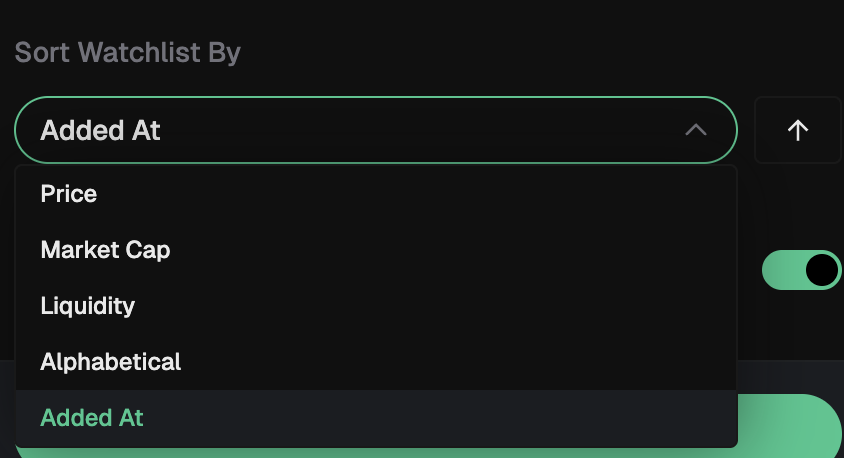
{% tab title="Sort Watchlist By" %}
Choose how tokens are ordered in your watchlist.

* **Added At** — When the token was added
* **Price** — Current token price
* **Market Cap** — Total market value
* **Liquidity** — Available liquidity
* **Alphabetical** — Token name (A–Z)

Use the arrow to switch between ascending and descending order.

<figure><img src="/files/laE4WPzvaDqRlU5l9P8e" alt=""><figcaption><p>Sort Watchlist Option</p></figcaption></figure>
{% endtab %}

{% tab title="Show Details on Hover" %}
Display key token stats when hovering over items in your watchlist.

<figure><img src="/files/3ZE85DA4YutAi9MUFTzK" alt=""><figcaption><p>Hover Token Stats Tab</p></figcaption></figure>
{% endtab %}
{% endtabs %}


---

# Agent Instructions
This documentation is published with GitBook. GitBook is the documentation platform designed so that both humans and AI agents can read, navigate, and reason over technical content effectively. Learn more at gitbook.com.

## Querying This Documentation
If you need additional information that is not directly available in this page, you can query the documentation dynamically by asking a question.

Perform an HTTP GET request on the current page URL with the `ask` query parameter:

```
GET https://help.trade.fun/memecoins/token-page/favorites-charts.md?ask=<question>
```

The question should be specific, self-contained, and written in natural language.
The response will contain a direct answer to the question and relevant excerpts and sources from the documentation.

Use this mechanism when the answer is not explicitly present in the current page, you need clarification or additional context, or you want to retrieve related documentation sections.